Payment Flow
Written By Catalin Fetean
Last updated Over 1 year ago
Below is a three-part deep-dive into how Nexity handles payment workflows—covering:
Payments using Circle Wallets (wires, on-chain USDC, Circle’s APIs)
Payments using Banks (via Nexity’s open banking infrastructure, built on PSD2 principles)
Payments using MetaMask Wallets (on-chain stablecoins, typically USDC)
These flows integrate into Nexity’s overall order, invoice, and contract system, ensuring businesses can seamlessly pay or get paid in whichever method best suits their needs.
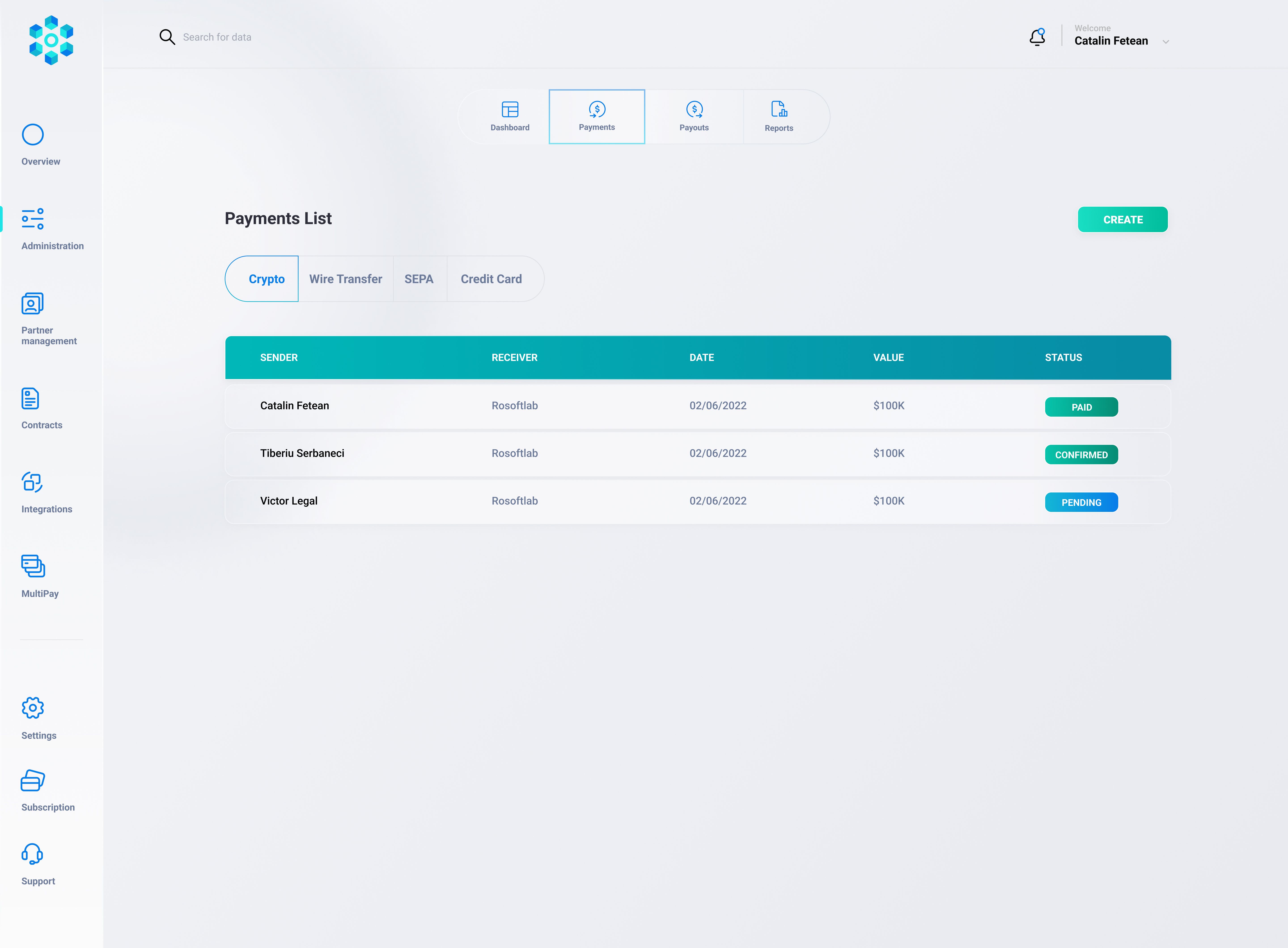
Payments Using Circle Wallets
Overview
Circle provides a powerful fiat-crypto bridge. Nexity leverages Circle’s Payments API, Core Functionality API, and Payouts API for:
Onboarding fiat (wires, ACH, etc.) into Nexity’s Circle master wallet as USDC
Sending USDC to external addresses or back to user accounts
Receiving on-chain USDC deposits via deposit addresses
Off-ramping (payout) to user bank accounts as fiat
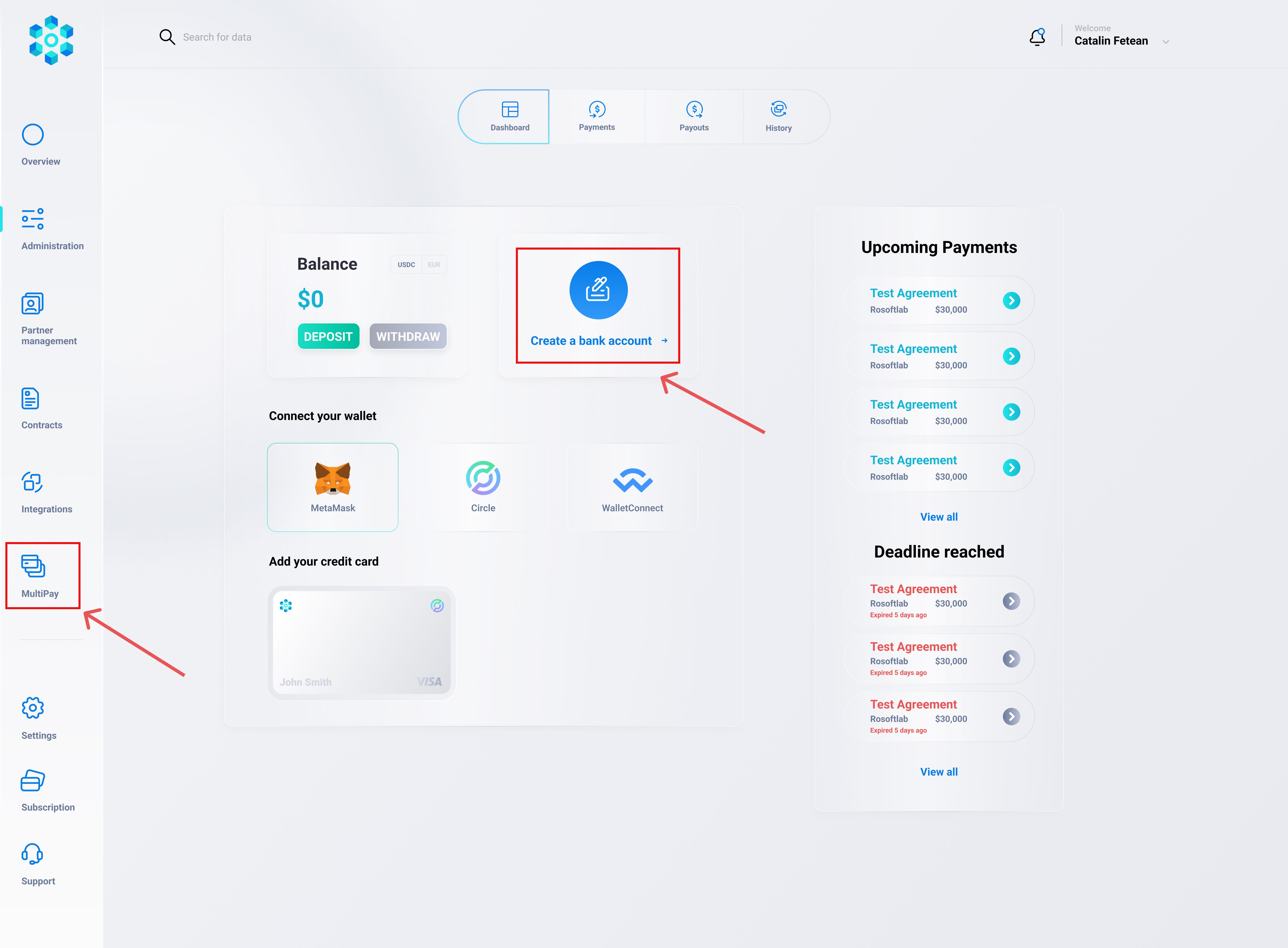
This flow is ideal when a user wants to:
Deposit funds from their bank into Nexity (converted to USDC).
Pay an invoice in USDC from their Circle sub-balance or from an external wallet.
Withdraw their balance back to a traditional bank account.
Detailed Steps
Link a Bank / Wire Instructions
A user (or Nexity itself) can link a bank account via Circle’s
POST /businessAccount/banks/wires.The user obtains wire instructions (SWIFT/IBAN info plus a reference ID) to deposit fiat into Nexity’s Circle master wallet.
Fiat Deposit Arrives
Once the wire is received, Circle converts the fiat to USDC at a 1:1 ratio in Nexity’s master account.
The user sees their “available USDC balance” in Nexity’s dashboard (the system maps which user the deposit belongs to).
Initiate a Payment
When paying an invoice or an order:
If the user’s “internal USDC balance” (held in the Circle master wallet on their behalf) has enough funds, they can proceed.
Nexity calls
POST /businessAccount/transfersto move the relevant USDC from the master wallet to the seller or escrow address.
On-Chain USDC Option
If the user wants to pay on-chain directly from Circle to an external wallet (perhaps the seller’s MetaMask), Nexity configures a recipient address with
POST /businessAccount/wallets/addresses/recipient.Then Nexity initiates a 1st-party USDC transfer to that address.
Off-Ramping (Payouts)
If the seller wants to withdraw USDC as fiat, they link their bank via
POST /businessAccount/banks/wiresor usePOST /businessAccount/payoutsto request a wire.Circle automatically converts USDC back to USD/EUR and sends a wire to the seller’s bank.
Key Technical Endpoints & Considerations
Bank Linking:
POST /businessAccount/banks/wires→ obtains wire instructions.Receiving Fiat:
The user includes Circle Tracking Reference in the wire memo, ensuring correct deposit to Nexity’s master wallet.Transferring USDC:
POST /businessAccount/transfers→ internal movements.On-Chain Address Generation:
POST /businessAccount/wallets/addresses/deposit→ each user can have a deposit address for inbound USDC from external wallets.Compliance:
Ensure the user’s KYC is done, bank details match exactly, track reference numbers to avoid deposit confusion.
Circle is especially suitable for cross-border or fast USDC transactions, letting Nexity unify bank-based and crypto-based payments under one system.
Technical Endpoints
Linking a Bank (for wires):
POST /businessAccount/banks/wires
# Body: { "accountNumber": "...", "routingNumber": "...", etc. }
Wire Instructions
GET /businessAccount/banks/wires/{bankId}/instructionsCreating a Deposit Address (On-chain)
POST /businessAccount/wallets/addresses/deposit
# Body: { "currency": "USD", "chain": "MATIC", "idempotencyKey": "<uuid>" }
Transferring USDC
POST /businessAccount/transfers
# Body: {
#   "source": { "type": "wallet", "id": "MASTER_WALLET_ID" },
#   "destination": { "type": "wallet", "id": "RECIPIENT_ID" },
#   "amount": { "amount": "100.00", "currency": "USD" }
# }
Key Considerations
Accurate Bank Info: Mismatch in SWIFT or reference can delay or lose the deposit.
Verification: Circle requires verification for external addresses.
Chain Selection: Must ensure the correct chain (Ethereum, Polygon, etc.) and only send the correct stablecoin.
Tracking: Nexity must track user balances in an internal ledger that correlates with Circle’s master wallet.
Additional Features
Bulk Payments:
If a user wants to pay multiple invoices in one go, Nexity uses/core/rest/api/bulk/initPayments/{paymentId}.Periodic (Recurring) Payments:
/core/rest/api/periodic/initPayment/{paymentId}sets up daily/weekly/monthly debits—great for subscription-style deals.Status Checks:
Nexity can periodically call/core/rest/api/status/{paymentId}(or bulk/periodic equivalents) to confirm real-time bank status codes (INIT,ACSP,RJCT, etc.).
Security & Compliance
X.509 Certificate:
Nexity obtains a TLS certificate from a CA, used to sign requests to the open banking API.OAuth2 + mTLS:
All communications are encrypted and require mutual TLS authentication.Data Protection:
Payment details (IBANs, amounts) are transmitted via secure channels.PSD2:
Since banks are PSD2-compliant, users authenticate with strong customer authentication (SCA).
This bank-based flow is perfect for local/regional payments (particularly in Romania, where partner banks are integrated) and for invoice or utility payments that users want to pay directly from their bank account.
Flow of Funds (1).pdf
3.4 MB• Document
Payments Using MetaMask Wallets
Overview
When a user or business wants to transact purely on-chain—paying in USDC (or another stablecoin) directly from their own self-custodial wallet—they can use MetaMask (or any Web3-compatible wallet). This flow bypasses banks or Circle custody for that specific payment, but Nexity still orchestrates the invoice/contract reference on the platform.
Detailed Process
User Chooses “Pay with MetaMask”
In the Nexity invoice or order payment page, the user sees an option “Pay On-Chain (USDC via MetaMask).”
The user is prompted to connect their MetaMask extension or mobile wallet.
Smart Contract / Payment Address
Nexity instructs the user to send USDC to a specific address (often a Nexity escrow or a direct seller’s on-chain address).
Alternatively, Nexity initiates a contract call to a function like
payInvoice(invoiceId, amount), which references the user’s wallet to sign the transaction.
User Signs Transaction
The user’s MetaMask asks for confirmation.
They pay network gas (e.g., on Ethereum Mainnet, Polygon, etc.) and sign the token transfer or contract call.
On-Chain Confirmation
The blockchain typically needs a few confirmations.
Nexity listens for an event (like
TransferorPaidInvoice) from the contract or checks the user’s on-chain transaction.Once confirmed, the invoice is marked “Paid” in Nexity’s system.
Optional Off-Ramp
If the seller wants fiat, they can convert USDC via Circle or deposit addresses.
Or they can keep the USDC for further on-chain usage.
Technical Implementation
A. Payment to a Single Address
If paying a simple USDC address:
Nexity provides the USDC contract address (e.g., on Polygon:
0x2791Bca1f2de4661ED88A30C99A7a9449Aa84174).Nexity provides a recipient address for the invoice.
The user calls
transfer(recipient, invoiceAmount)from their MetaMask.
B. Escrow or Payment Contract
function payInvoice(uint256 invoiceId, uint256 amount) external {
    // require user is paying the correct invoice
    // transfer USDC from msg.sender to this contract
    // update internal records
    // emit event InvoicePaid(invoiceId, msg.sender, amount)
}
The user calls approve() on the USDC contract, then calls payInvoice() with the invoice details. Nexity’s backend sees the InvoicePaid event on-chain, marking the invoice as settled.
Pros & Considerations
Pros:
Full user custody—no middleman controlling their funds.
Instant finality once on-chain transaction confirms.
Challenges:
The user must have ETH/MATIC for gas.
If the invoice is denominated in fiat, we do a conversion from USDC to fiat reference on the invoice side.
Payments Using Banks (Nexity’s Open Banking Infrastructure)
Nexity integrates a PSD2-based open banking system (similar to “SmartPay,” but rebranded for Nexity’s environment) to facilitate direct bank-to-bank payments for local or regional transactions.
Why PSD2/Open Banking?
Instant/near-instant bank transfers without credit card intermediaries.
Seamless user flow: they pick their bank, confirm payment in their banking app, and funds are transferred directly.
Lower fees vs. card payments, plus strong SCA compliance via the user’s bank.
Overall Purpose and Supported Banks
Nexity’s open banking infrastructure—sometimes referred to as our “Bank Payment Gateway”—is powered by a PSD2-compliant aggregator that connects to the largest Romanian banks:
BCR (Banca Comercială Română)
BRD (BRD Groupe Société Générale)
ING Bank
Banca Transilvania
Raiffeisen Bank
First Bank
Alpha Bank
CEC Bank
Garanti Bank
Libra Bank
Unicredit Bank
Revolut
Through these connections, Nexity users (buyers, payers) can instantly transfer money from their bank account to Nexity (or a seller) without needing traditional card rails or manual wire processes.
Workflow in Depth
Selecting “Pay by Bank”
In Nexity’s checkout or invoice payment screen, the user clicks “Pay by Bank” (or an equivalent label). This reveals the list of supported banks or a search box.
User picks a bank (e.g., BCR).
Nexity’s platform prepares to initiate a PSD2-based payment.
Authentication & Token Retrieval
Nexity must first authenticate with the aggregator using an X.509 certificate (obtained from a certified authority) and the partner’s client_id.
Call
POST /authenticate/rest/api/tokenQuery parameters:
client_id: Provided by the aggregator upon onboarding.isLink2PayorflexibleURLorisHeadless: Flags that change the token’s lifespan or user interface usage. (Only one can betrueat a time.)
Response:
Contains an
access_token,refresh_token(sometimes omitted ifflexibleURListrue), and apaymentId.The
access_tokenis valid for 30 minutes by default, or 60 days ifisLink2Pay=true.
This step ensures that Nexity is authorized to initiate a payment session on the user’s behalf.
Payment Initiation
With the valid access_token in hand, Nexity can proceed to create the actual payment instructions:
A) Single Payment
Endpoint:
POST /core/rest/api/initPayment/{paymentId}Path Variable:
paymentIdfrom the authentication step.Request Body:
creditorName: The beneficiary’s name (often Nexity or the seller).creditorIban: The IBAN receiving the funds.debtorIban: The payer’s IBAN (optional in some flows).debtorBank: The code of the chosen bank (e.g.,BCR,BRD,ING, etc.).amount: Payment amount.psuEmail,psuIntermediarId: Payer’s email and internal ID.redirectURL: Where the user is redirected after payment authorization.Others (e.g.,
isCorporate,psuId,details, etc.).
B) Bulk Payment
Endpoint:
POST /core/rest/api/bulk/initPayments/{paymentId}Used when paying multiple invoices/beneficiaries at once.
Contains an array of payment details, each with
creditorIban,amount, etc.
C) Periodic Payment
Endpoint:
POST /core/rest/api/periodic/initPayment/{paymentId}For recurring or scheduled payments, includes fields like
startDate,endDate,frequency, anddayOfExecution.
Response: redirectUri
The aggregator responds with a redirectUri. Nexity’s frontend redirects the user’s browser to this URI. It points to a secure page that shows the payment details (amount, beneficiary, etc.).
User Authorization at Bank
User is redirected to the aggregator’s page.
The aggregator instantly redirects or frames the user’s selected bank’s internet/mobile banking login.
The user logs in with their bank credentials (SCA: typically 2-factor authentication).
The user reviews the transaction details:
The beneficiary IBAN is the
creditorIban.The amount is the specified
amount.
The user approves or rejects the payment.
Upon finishing, the user is sent back to Nexity’s specified redirectURL. This final redirect might contain a status code or reference. However, to be sure, Nexity also calls the status-check endpoint (below).
Checking Payment Status
After the user returns, Nexity calls:
Single Payment:
GET /core/rest/api/status/{paymentId}Bulk Payment:
GET /core/rest/api/bulk/status/{paymentId}Periodic Payment:
GET /core/rest/api/periodic/status/{paymentId}
Common statuses:
INIT: Payment initiated, before reaching the bank.RCVD: Bank received the payment request, awaiting user authorization.ABND: “Abandoned” if user never authorized it.ACSP: Payment accepted for settlement.ACSC: Settlement completed (money is now transferred).RJCT: Payment rejected by the bank.CANC: Payment canceled by the user.
If Nexity sees ACSC, it marks the invoice/order as “Paid”. If RJCT, Nexity notifies the user that the payment was refused.
Settlement to Nexity’s Account
The aggregator’s PSD2 gateway ensures the funds move from the user’s bank account to Nexity’s or the seller’s designated IBAN. That IBAN is typically configured in creditorIban. Once the bank completes the transfer, Nexity sees the deposit in that account.
If Nexity is the main beneficiary, the system can credit the user’s internal ledger or close out an invoice.
If the final beneficiary is the seller, the aggregator transfers directly to the seller’s IBAN.
Security / Technical Setup
X.509 Certificate: Nexity obtains a certificate from a CA, which is used for TLS mutual authentication with the open banking gateway.
OAuth2: Each payment session uses an
access_tokentied to a specificpaymentId.Possible Payment Types:
Single (one invoice).
Bulk (multiple invoices).
Periodic (automatic recurring payments).
A) Getting Access Token:
import axios from 'axios';

async function getAuthToken(clientId) {
  const resp = await axios.post(
    'https://api.nexitybanking.com/authenticate/rest/api/token',
    null, // or any required body
    { params: { client_id: clientId } }
  );
  return resp.data;
}
B) Initiating Single Payment:
async function initSinglePayment(paymentId, paymentData, accessToken) {
  const resp = await axios.post(
    `https://api.nexitybanking.com/core/rest/api/initPayment/${paymentId}`,
    paymentData,
    { headers: { Authorization: `Bearer ${accessToken}` } }
  );
  return resp.data;
}
C) Checking Status:
async function getPaymentStatus(paymentId, accessToken) {
  const resp = await axios.get(
    `https://api.nexitybanking.com/core/rest/api/status/${paymentId}`,
    { headers: { Authorization: `Bearer ${accessToken}` } }
  );
  return resp.data;
}
Business Advantages
Instant or near-instant settlement for local payments.
Lower transaction fees than credit cards.
Full compliance with PSD2’s strong customer authentication.
Practical Flow Example (Real-World Scenario)
Invoice: Buyer sees an invoice for RON 10,000 in Nexity.
User Chooses Bank: They pick “ING Bank” from a list of banks.
Token: Nexity calls
/authenticate/rest/api/token?client_id=abc123→ getsaccess_token,paymentId=999.Init Payment:
POST /core/rest/api/initPayment/999
Authorization: Bearer <access_token>
{
  "creditorName": "Nexity SRL",
  "creditorIban": "RO09INGB000012345678",
  "debtorBank": "ING",
  "amount": 10000,
  "psuEmail": "buyer@example.com",
  "redirectURL": "https://nexity.com/paymentComplete",
  "details": "Invoice #INV-2023-457 for goods"
}
The response includes { "messageStatus": "...", "redirectUri": "https://api.nexitybanking.com/paymentsession/..." }
Redirect: Nexity front-end sends user to
redirectUri.User Logs In: The user enters ING’s online banking credentials, sees the “Nexity SRL” payment request.
Approves Payment: The user enters a PIN/OTP.
Redirect Back: The user lands on
https://nexity.com/paymentComplete.Status Check: Nexity calls
GET /core/rest/api/status/999with the sameaccess_token. If the aggregator saysACSC, Nexity marks invoice as paid.Settlement: Funds appear in Nexity’s (or the seller’s) “RO09INGB0000…” IBAN typically within seconds/minutes (depending on how the bank processes internal or interbank transfers).
Was this helpful?
Still need help? Share an idea