Contract Tokenization Flow
Written By Catalin Fetean
Last updated Over 1 year ago
Overview
When two parties—such as a buyer and a seller—want to formalize a deal on Nexity, they create a Contract. This contract specifies the details of the goods or services, the agreed-upon price, and the timelines. Once both sides finalize and sign, the contract becomes the single source of truth for that transaction.
Why It Matters
Ensures both parties are on the same page about requirements and obligations.
Stores all contract details in one secure place.
Optionally provides on-chain reference for added security and transparency (though this happens behind the scenes if your organization needs it).
High-Level Flow
Draft: One party starts a new draft, adding the main details (what’s being sold, price, delivery terms, etc.).
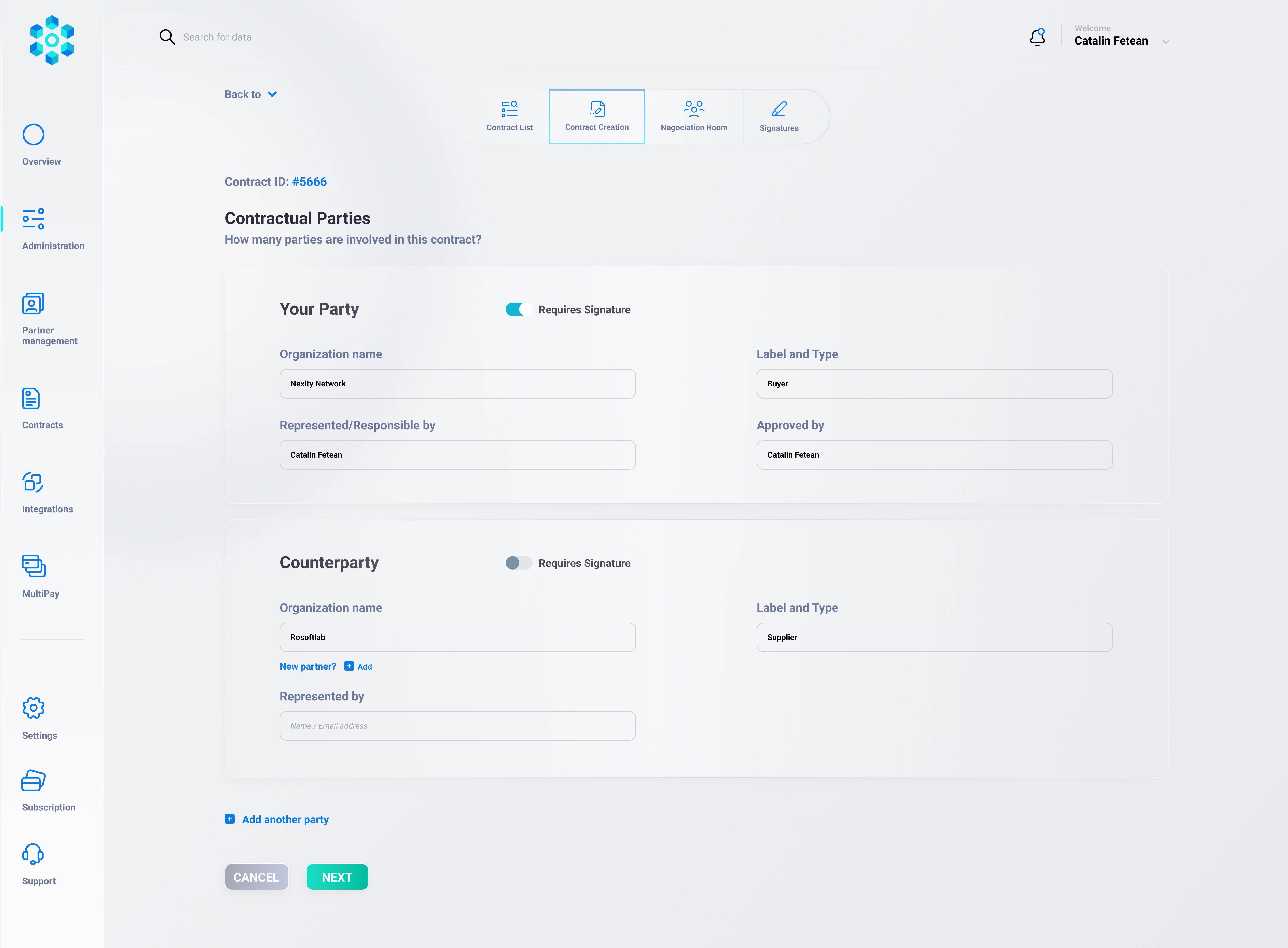
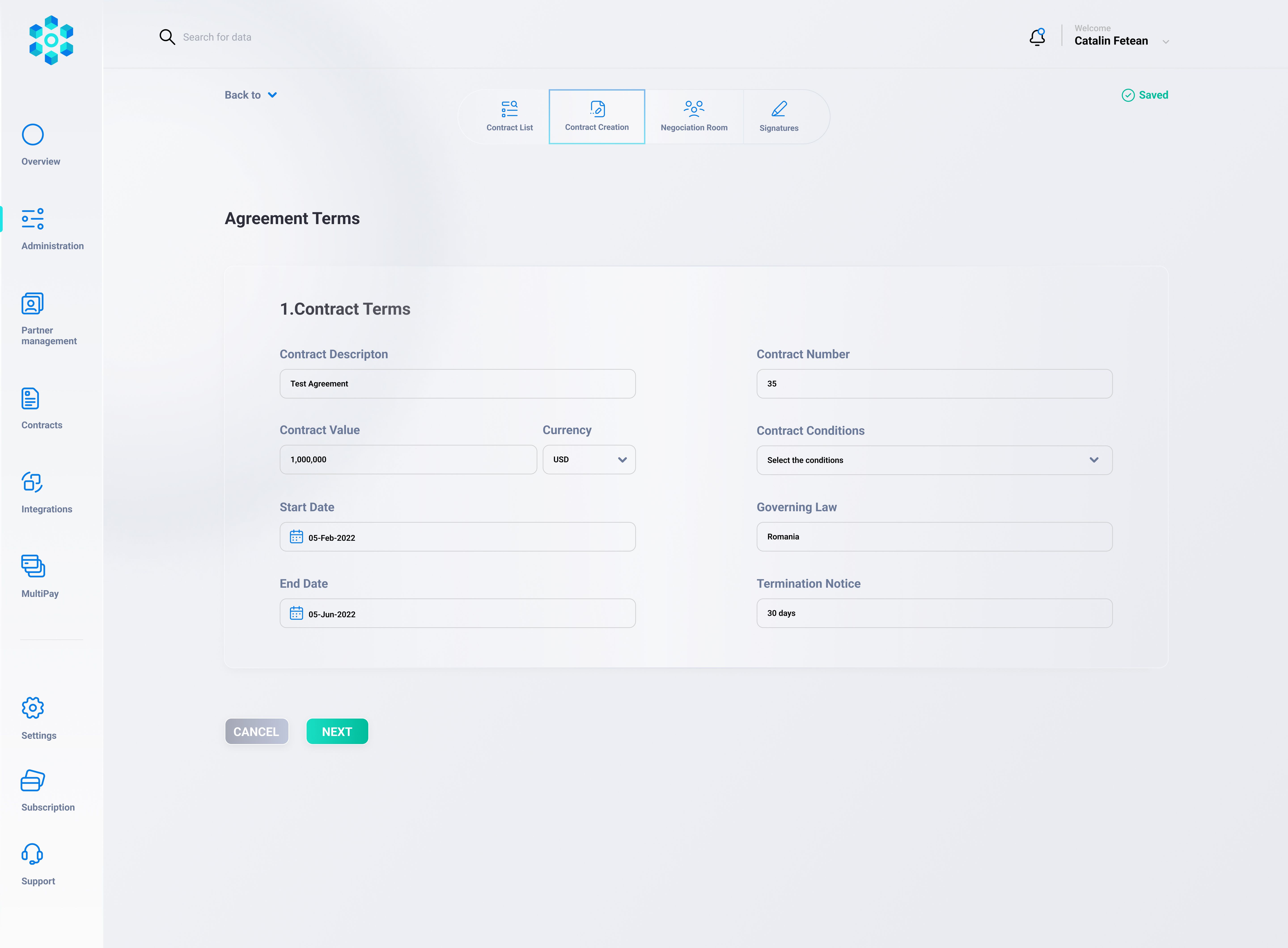
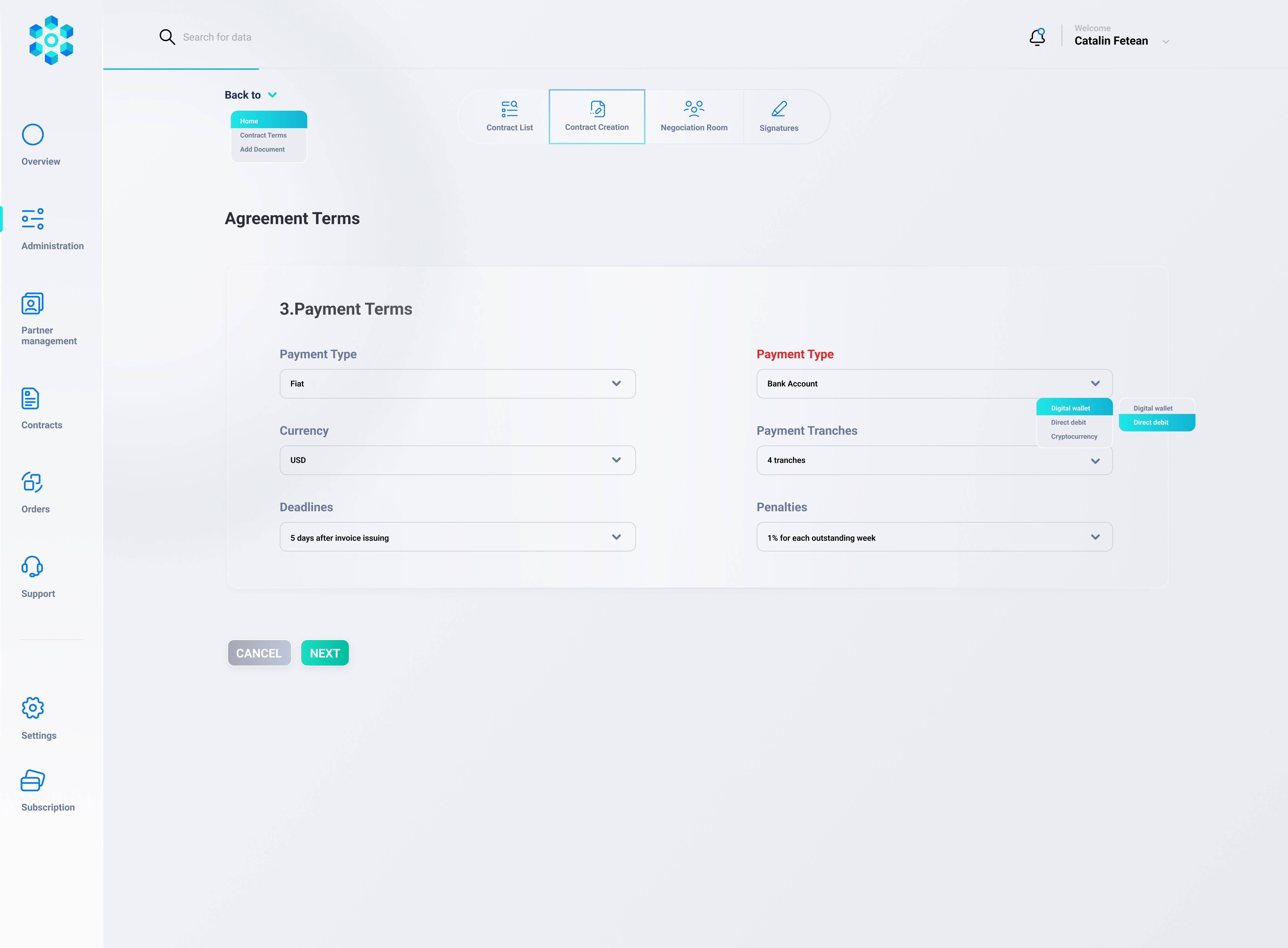
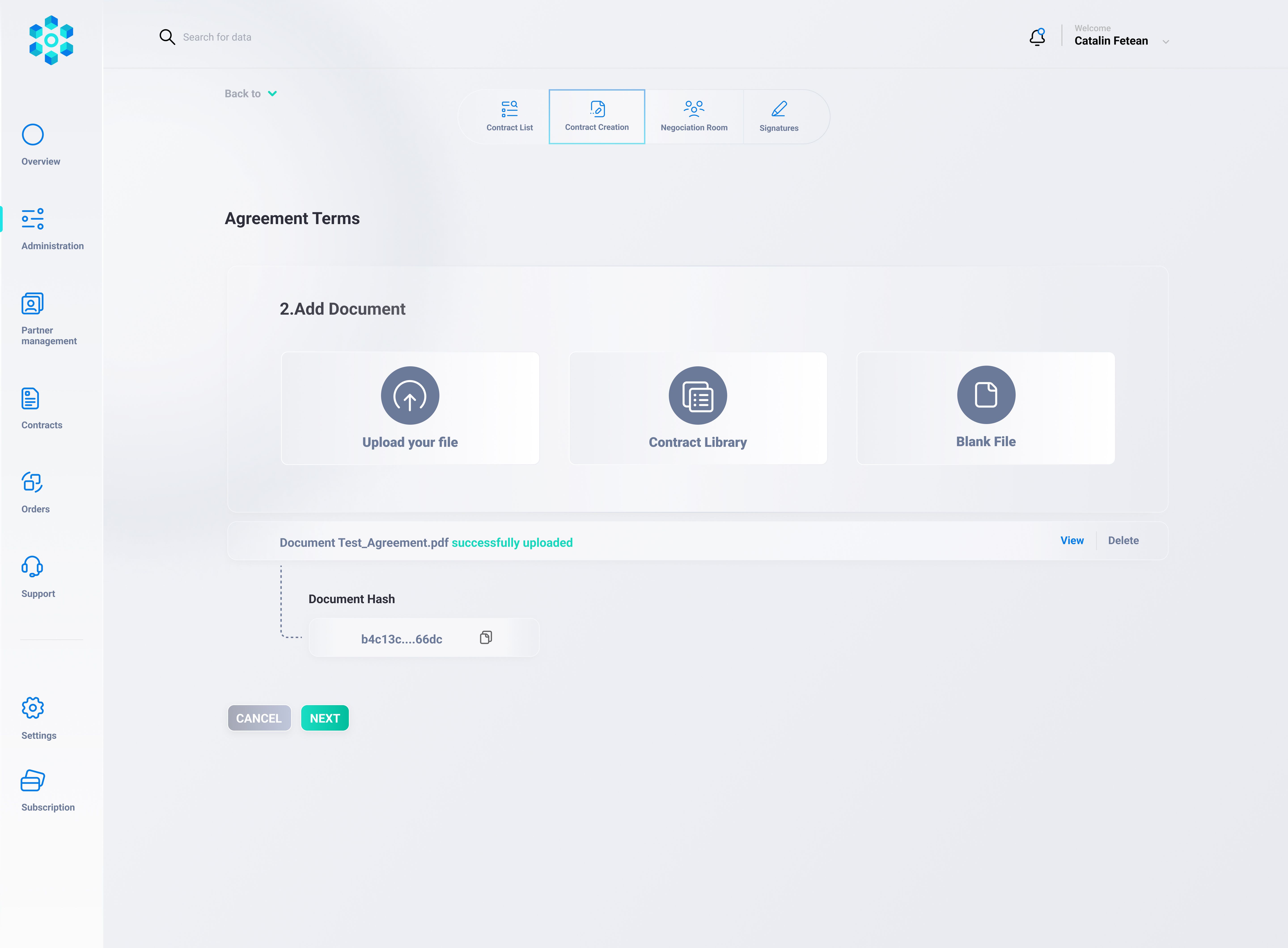
Review: Both parties can check the draft and adjust any terms.
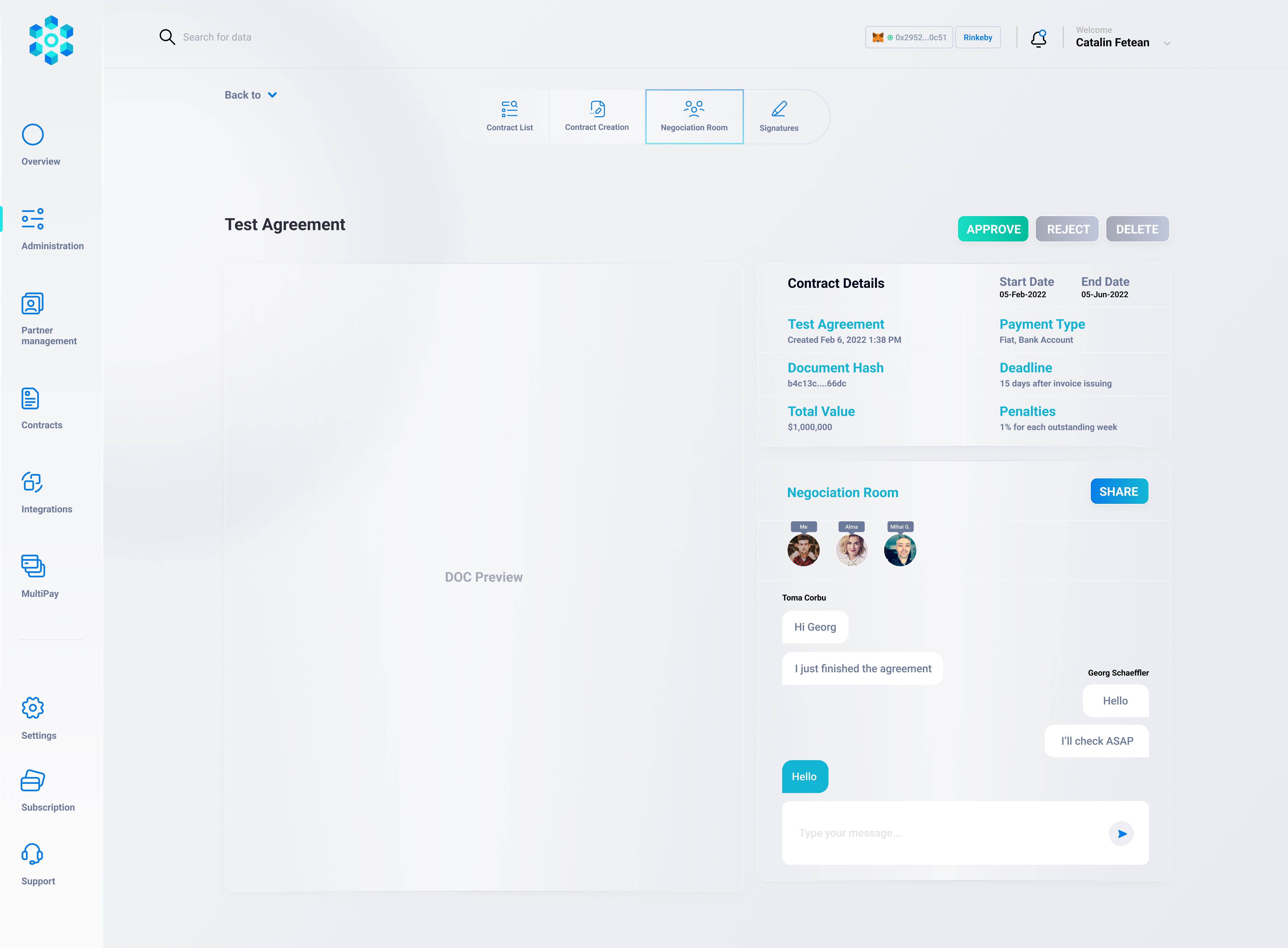
Sign: Each party provides a digital signature to confirm they agree.
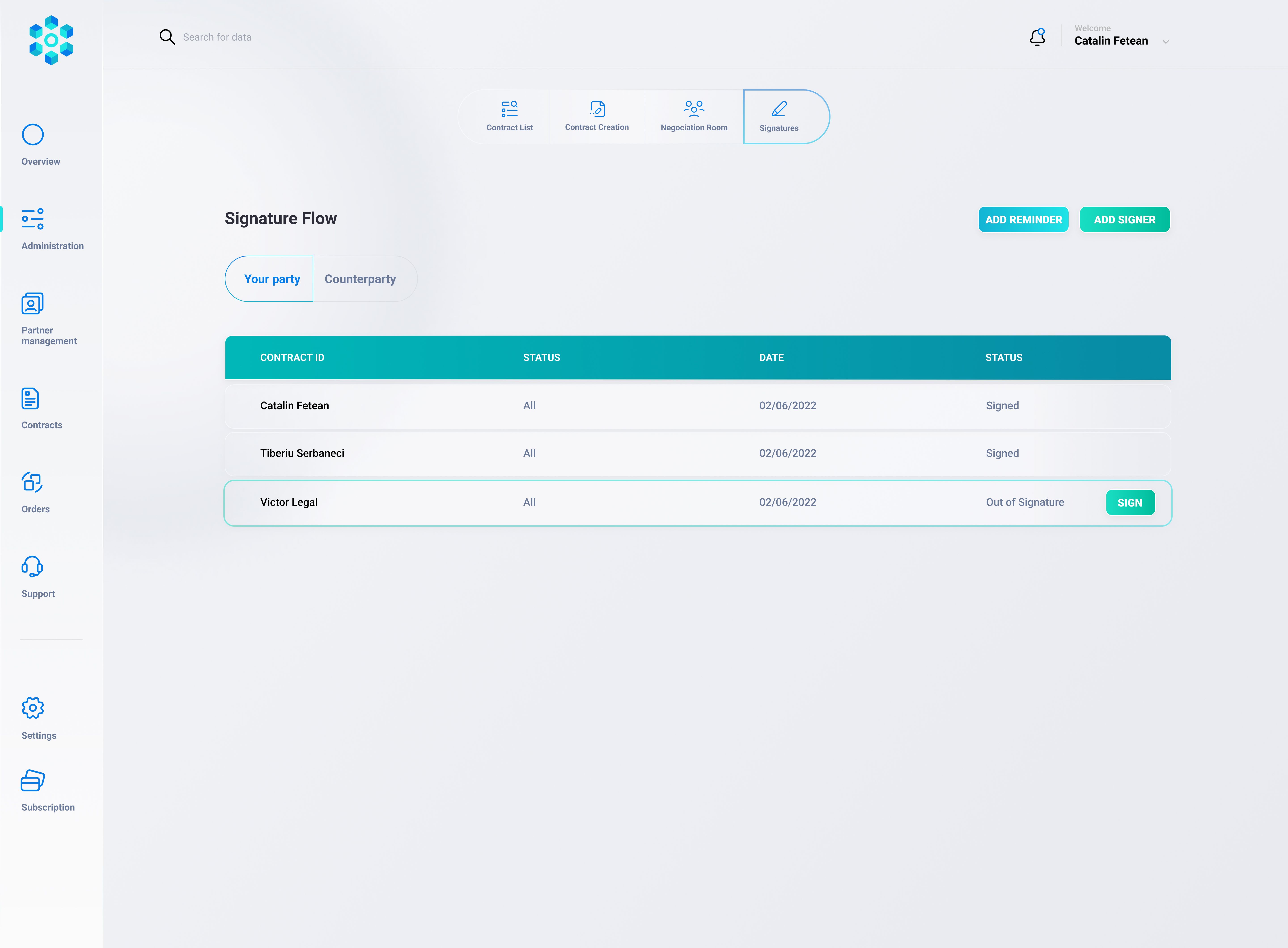
Active: Once signed, the contract is considered “live,” and any next steps (like placing orders) can begin.
Step-by-Step: Creating a Contract
Initiate
From the main dashboard, click “Create a New Contract.”
Fill in key fields like the buyer/seller names and the scope of what’s being contracted.
Add Terms and Documents
Include your payment terms (e.g. 50% upfront, 50% on delivery).
If needed, attach or reference extra documents (like official specs or special clauses).
Preview
Nexity presents a clean summary or document view.
Double-check that quantities, prices, timelines, and responsibilities look correct.
Finalize
Once satisfied, the contract moves to a Final state.
Nexity may generate a PDF or store a reference in the system (and optionally on the blockchain).
Obtain Signatures
The buyer and seller (or any designated signers) each confirm agreement by clicking “Sign.”
Nexity updates the status to “Active Contract” once everyone signs.
Additional Options
On-Chain Tokenization
If you want an extra layer of security, Nexity can store a digital fingerprint of the contract on a blockchain. This is usually invisible to you—just an extra guarantee that no one can change contract details.Integration with Other Flows
After a contract is active, you can seamlessly launch orders or initiate payments based on those contract terms. Nexity keeps track of everything, so you don’t have to retype details.
Key Business Benefits
Clarity: You know exactly what was agreed upon, with all details in one document.
Speed: Creating and signing happens in a few clicks—no endless email chains or confusion over the latest version.
Security: Digital signatures and optional blockchain references ensure the contract can’t be tampered with.
Workflow Alignment: Once a contract is in place, it’s easy to trigger the Order Flow or Payment Flow next.
Business-Level Overview
Drafting the Contract
A user (buyer or seller) clicks “Create New Contract” in the Nexity dashboard.
They enter the main deal details: names of parties, goods/services, price, terms, and any special clauses.
Review & Finalize
The contract draft is displayed as a neat document (PDF or HTML).
The user checks the information, makes edits if needed, and clicks “Finalize” once everything looks good.
Signatures
Both parties (buyer and seller) are prompted to sign. In Nexity, this can be a digital signature prompt.
After both parties sign, the contract status changes to Active and can’t be altered without mutual consent.
On-Chain (Optional)
If your organization requires blockchain security, Nexity can register a “fingerprint” (hash) of the contract or deploy a specialized smart contract.
This ensures the contract terms are tamper-proof and verifiable on a public or private chain.
Technical Details
Database Model
CREATE TABLE contracts (
  id SERIAL PRIMARY KEY,
  contract_number VARCHAR(50) UNIQUE NOT NULL,
  buyer_id INT REFERENCES users(id),
  seller_id INT REFERENCES users(id),
  title VARCHAR(255),
  description TEXT,
  amount NUMERIC(18,2),
  currency VARCHAR(10),
  status VARCHAR(50) DEFAULT 'DRAFT', -- e.g., 'DRAFT', 'PENDING_SIGNATURE', 'ACTIVE', 'COMPLETED', 'CANCELLED'
  on_chain_address VARCHAR(100),      -- if we deploy on chain
  doc_hash VARCHAR(255),             -- hash of the contract document
  buyer_signed BOOLEAN DEFAULT false,
  seller_signed BOOLEAN DEFAULT false,
  created_at TIMESTAMP DEFAULT NOW(),
  updated_at TIMESTAMP DEFAULT NOW()
);
Creating a Draft Contract
// src/routes/contracts.js
const router = require('express').Router();
const authMiddleware = require('../middleware/auth');
const { pool } = require('../db');
const crypto = require('crypto');

// Utility function for a contract number
function generateContractNumber() {
  const now = new Date();
  return `CONT-${now.getFullYear()}-${crypto.randomBytes(3).toString('hex')}`;
}

// 1. Create a Draft Contract
router.post('/', authMiddleware, async (req, res) => {
  const { buyerId, sellerId, title, description, amount, currency } = req.body;

  try {
    // Contract number generation
    const contractNumber = generateContractNumber();

    // Insert draft into DB
    const insertQuery = `
      INSERT INTO contracts (
        contract_number, buyer_id, seller_id, title, description, amount, currency, status
      )
      VALUES ($1, $2, $3, $4, $5, $6, $7, 'DRAFT')
      RETURNING *
    `;
    const values = [contractNumber, buyerId, sellerId, title, description, amount, currency];
    const result = await pool.query(insertQuery, values);

    return res.status(201).json({
      message: 'Contract draft created',
      contract: result.rows[0]
    });
  } catch (error) {
    console.error(error);
    return res.status(500).json({ error: 'Internal server error' });
  }
});

module.exports = router;
Finalizing & Hashing the Document
// 2. Finalize and store doc hash
router.post('/:id/finalize', authMiddleware, async (req, res) => {
  const contractId = req.params.id;
  // Suppose the front-end sends a base64-encoded PDF or HTML
  const { contractDocumentBase64 } = req.body;

  try {
    // 1) Compute the hash
    const buffer = Buffer.from(contractDocumentBase64, 'base64');
    const docHash = crypto.createHash('sha256').update(buffer).digest('hex');

    // 2) Update contract status and store the hash
    const updateQuery = `
      UPDATE contracts
      SET doc_hash = $1,
          status   = 'PENDING_SIGNATURE',
          updated_at = NOW()
      WHERE id = $2
      RETURNING *
    `;
    const result = await pool.query(updateQuery, [docHash, contractId]);

    if (result.rowCount === 0) {
      return res.status(404).json({ error: 'Contract not found' });
    }
    return res.json({
      message: 'Contract finalized. Signatures required.',
      contract: result.rows[0]
    });
  } catch (error) {
    console.error(error);
    return res.status(500).json({ error: 'Internal server error' });
  }
});
Signing the Contract
// 3. Signing the Contract
router.post('/:id/sign', authMiddleware, async (req, res) => {
  const contractId = req.params.id;
  const userId = req.user.userId;

  try {
    // Fetch contract
    const contractResult = await pool.query(
      'SELECT * FROM contracts WHERE id = $1',
      [contractId]
    );
    if (contractResult.rows.length === 0) {
      return res.status(404).json({ error: 'Contract not found' });
    }
    const contract = contractResult.rows[0];

    // Determine if user is buyer or seller
    let updateField = null;
    if (contract.buyer_id === userId) {
      updateField = 'buyer_signed';
    } else if (contract.seller_id === userId) {
      updateField = 'seller_signed';
    } else {
      return res.status(403).json({ error: 'Not authorized to sign' });
    }

    // Mark as signed
    await pool.query(
      `UPDATE contracts
       SET ${updateField} = true, updated_at = NOW()
       WHERE id = $1`,
      [contractId]
    );

    // Check if both have signed
    const checkResult = await pool.query(
      'SELECT buyer_signed, seller_signed FROM contracts WHERE id = $1',
      [contractId]
    );
    const { buyer_signed, seller_signed } = checkResult.rows[0];
    if (buyer_signed && seller_signed) {
      // Update status to 'ACTIVE'
      await pool.query(
        `UPDATE contracts
         SET status = 'ACTIVE'
         WHERE id = $1`,
        [contractId]
      );
    }

    return res.json({ message: 'Contract signed successfully' });
  } catch (error) {
    console.error(error);
    return res.status(500).json({ error: 'Internal server error' });
  }
});
Smart Contract (Solidity)
// SPDX-License-Identifier: MIT
pragma solidity ^0.8.17;

/**
 * @title NexityContractRegistry
 * @dev Simple registry to record the hash of an off-chain contract doc plus buyer/seller addresses
 */
contract NexityContractRegistry {
    struct ContractRecord {
        address buyer;
        address seller;
        string docHash; // e.g., a SHA-256 hash of the contract text
        bool buyerSigned;
        bool sellerSigned;
        bool isActive;
    }

    // Map a unique ID (e.g. contractNumber hashed) to a ContractRecord
    mapping(bytes32 => ContractRecord) public contracts;

    event ContractCreated(bytes32 indexed contractId, address buyer, address seller, string docHash);
    event ContractSigned(bytes32 indexed contractId, address signer);

    function createContract(bytes32 _contractId, address _buyer, address _seller, string memory _docHash) public {
        // Typically restricted by some access control
        require(contracts[_contractId].buyer == address(0), "Contract already exists");

        contracts[_contractId] = ContractRecord({
            buyer: _buyer,
            seller: _seller,
            docHash: _docHash,
            buyerSigned: false,
            sellerSigned: false,
            isActive: false
        });

        emit ContractCreated(_contractId, _buyer, _seller, _docHash);
    }

    function signContract(bytes32 _contractId) public {
        ContractRecord storage rec = contracts[_contractId];
        require(rec.buyer != address(0), "Contract does not exist");
        require(!rec.isActive, "Contract is already active");

        // If the caller is the buyer or the seller, mark them as signed
        if (msg.sender == rec.buyer) {
            rec.buyerSigned = true;
        } else if (msg.sender == rec.seller) {
            rec.sellerSigned = true;
        } else {
            revert("Not authorized to sign");
        }

        emit ContractSigned(_contractId, msg.sender);

        if (rec.buyerSigned && rec.sellerSigned) {
            rec.isActive = true; // both have signed, contract is active
        }
    }
}
How it ties back:
When you finalize the contract off-chain, you compute its
docHash.Then you call
createContract(...)on this registry withcontractId = keccak256(...some unique value...)and storedocHashin the record.Buyer/seller can sign on-chain using their wallets. The contract updates the record to
isActiveonce both sign.Your Node.js backend can store the
on_chain_addressor thecontractIdreturned by the blockchain in thecontractstable.
Best Practices
Versioning & Edits
When the contract is in DRAFT, multiple edits are allowed.
Once FINALIZED, it’s locked. If changes are needed, you can either “unfinalize” or create an amendment contract.
Notifications & Reminders
Each significant step (finalizing, signing) triggers notifications:
Email or In-app notification to the other party: “Contract #XYZ is ready for your signature.”
This ensures all parties stay updated and no steps get overlooked.
Security & Access Control
Only buyer or seller (or authorized delegates) can sign the contract.
Admin can override in certain cases if needed (e.g., force-cancel a fraudulent contract).
Integration with Payment & Order Modules
Once a contract is ACTIVE, a user can:
Launch Orders referencing the contract’s ID (the platform automatically pulls price or quantity from the contract).
Initiate Payment (Part 8), possibly referencing the contract for escrow or direct settlement.
Escrow Logic (Optional)
If you want to hold funds until the contract terms are met, the same on-chain contract can incorporate an escrow function.
Alternatively, the contract references Circle or open banking flows, where the final payment is triggered only after contract completion.
Was this helpful?
Still need help? Share an idea