Order Flow & Invoice Tokenization
Written By Catalin Fetean
Last updated Over 1 year ago
Why This Matters:
Streamlined Tracking: All details (quantity, price, status) are consistent with the contract.
Automated Invoicing: Minimizes manual data entry, reduces errors.
Clear Accountability: Buyer and seller see the same real-time status.
Next Step: Once the invoice is paid, finances are reconciled, and the buyer receives goods.
After creating and signing a contract, the Order Flow kicks in:
Order Placement
A buyer who has an active contract can create one or more orders referencing that contract.
For example, if the contract says “10,000 widgets at $5 each,” the buyer can place an order requesting a certain quantity, specifying delivery dates, shipping instructions, etc.
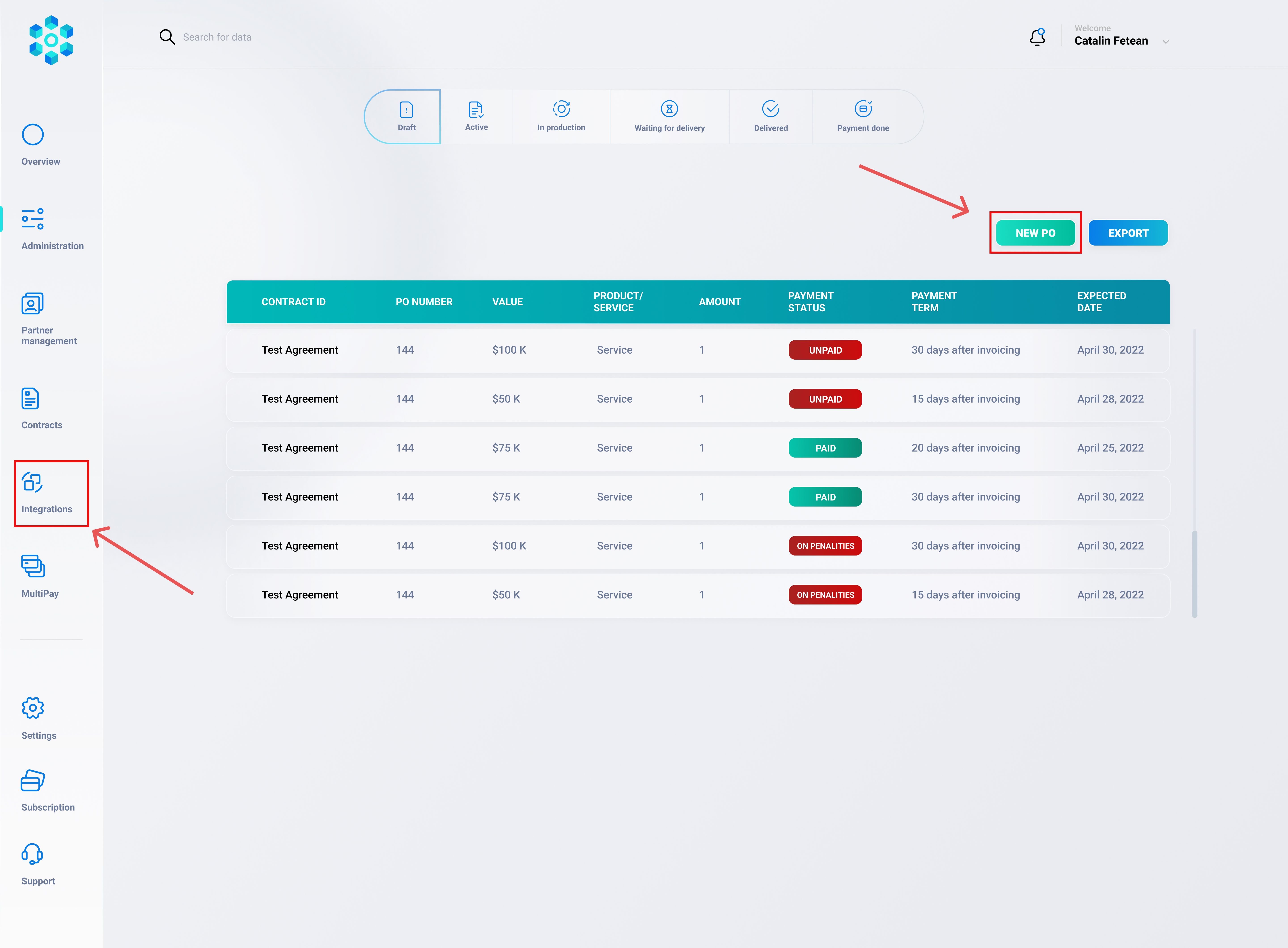
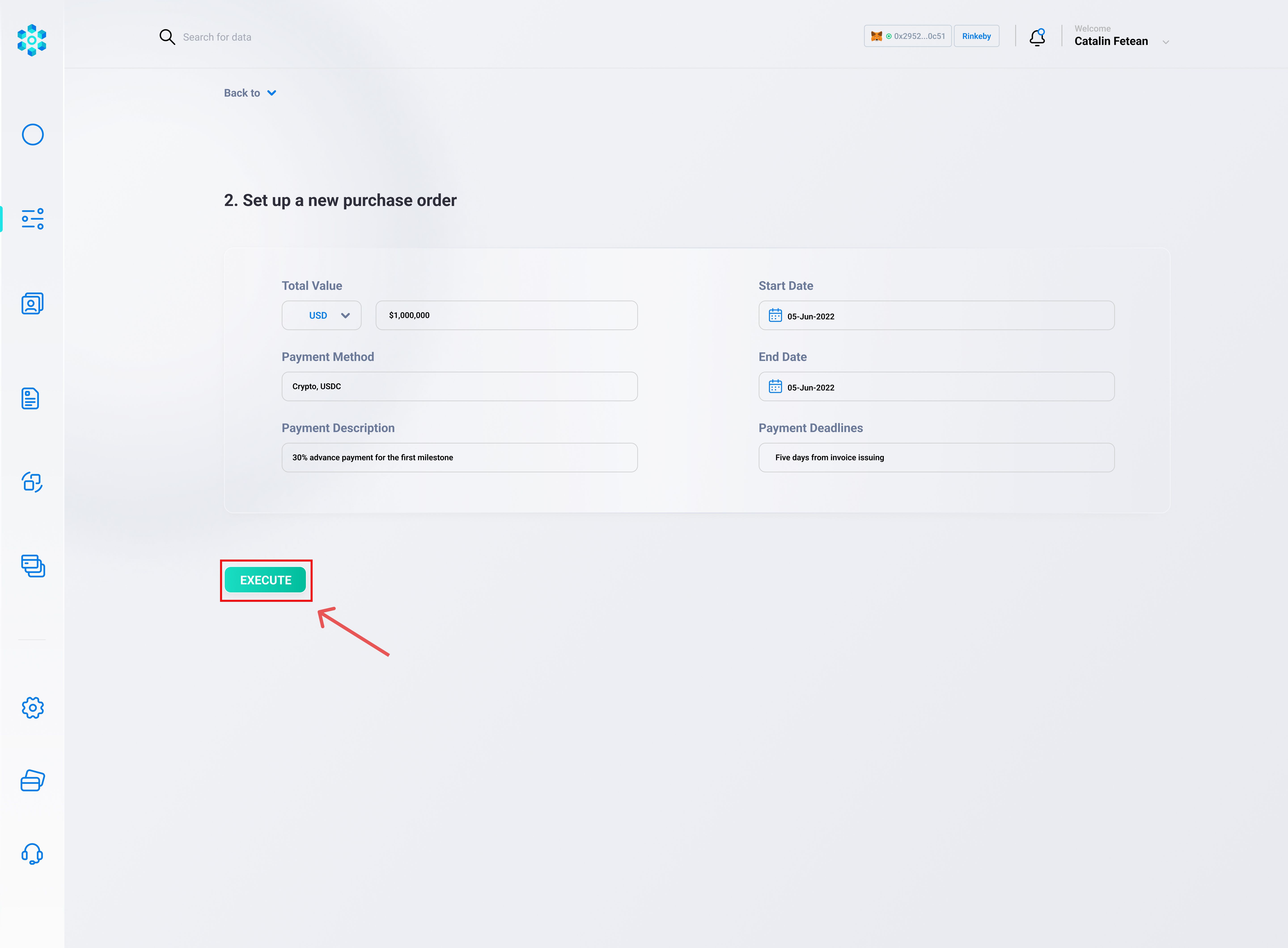
Order Confirmation
The seller sees the new order in their dashboard, reviews it, and can confirm or request changes (for instance, adjusting shipment details).
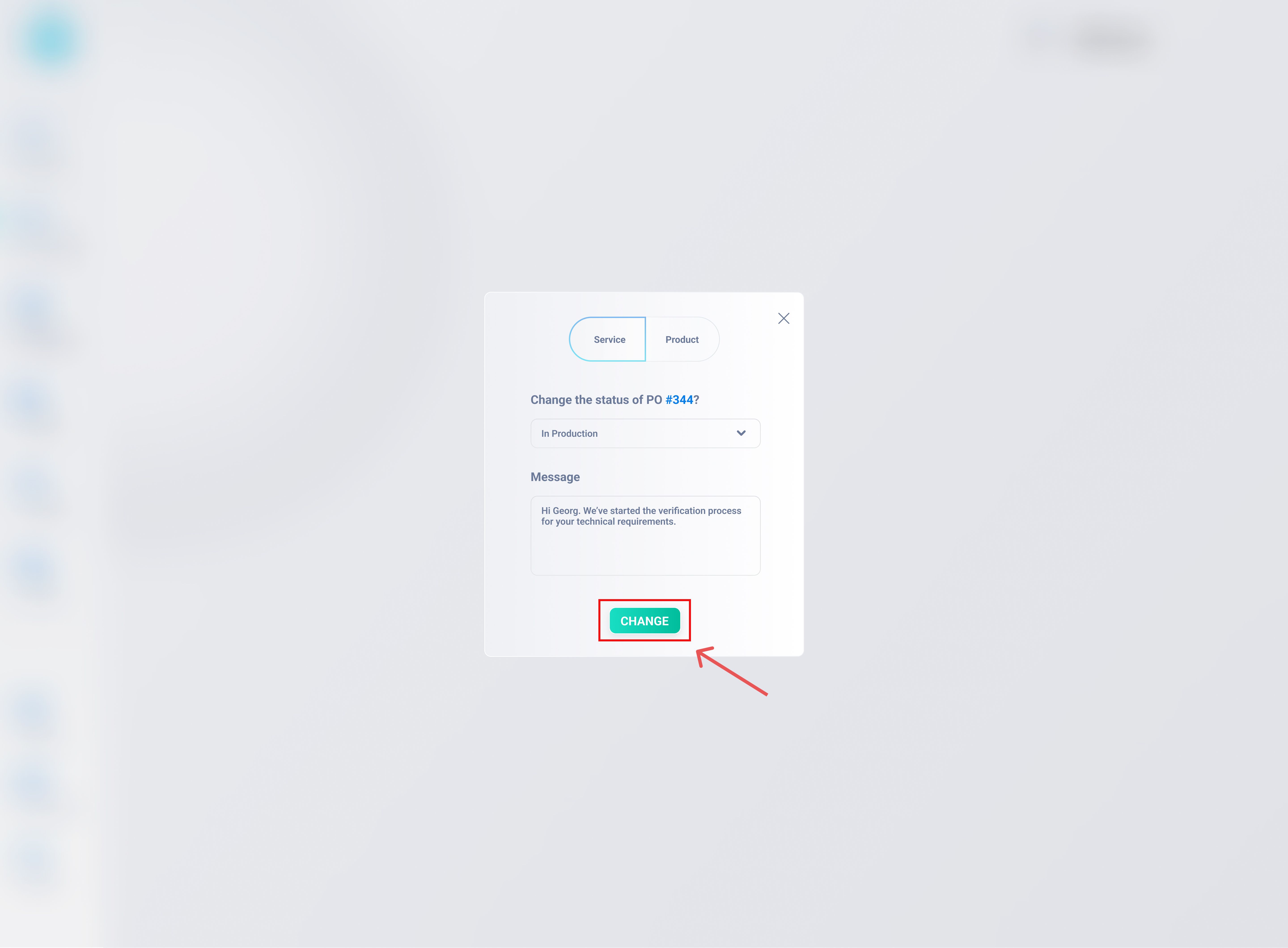
Once confirmed, the order status becomes something like “IN PROGRESS” or “PROCESSING.”
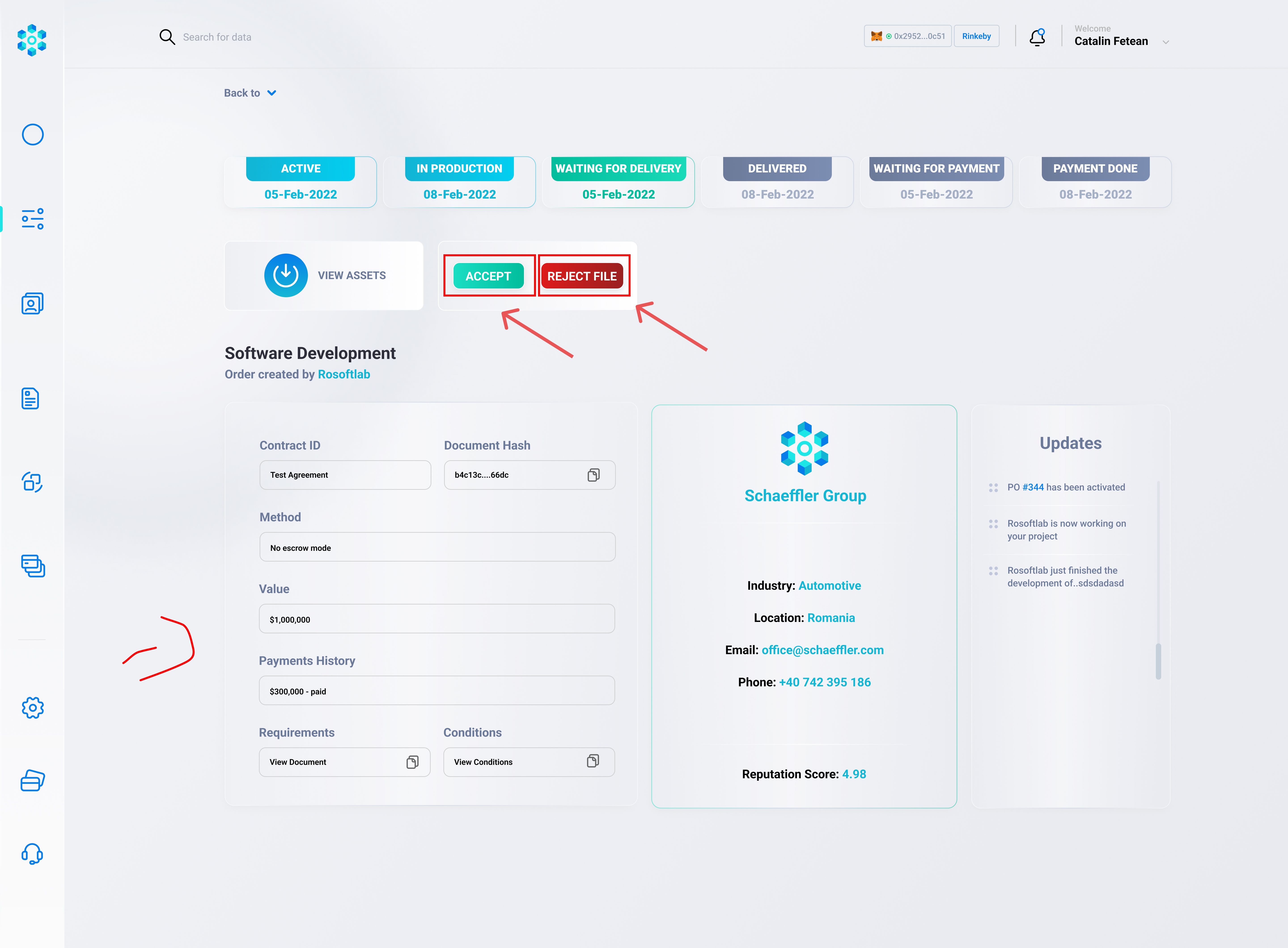
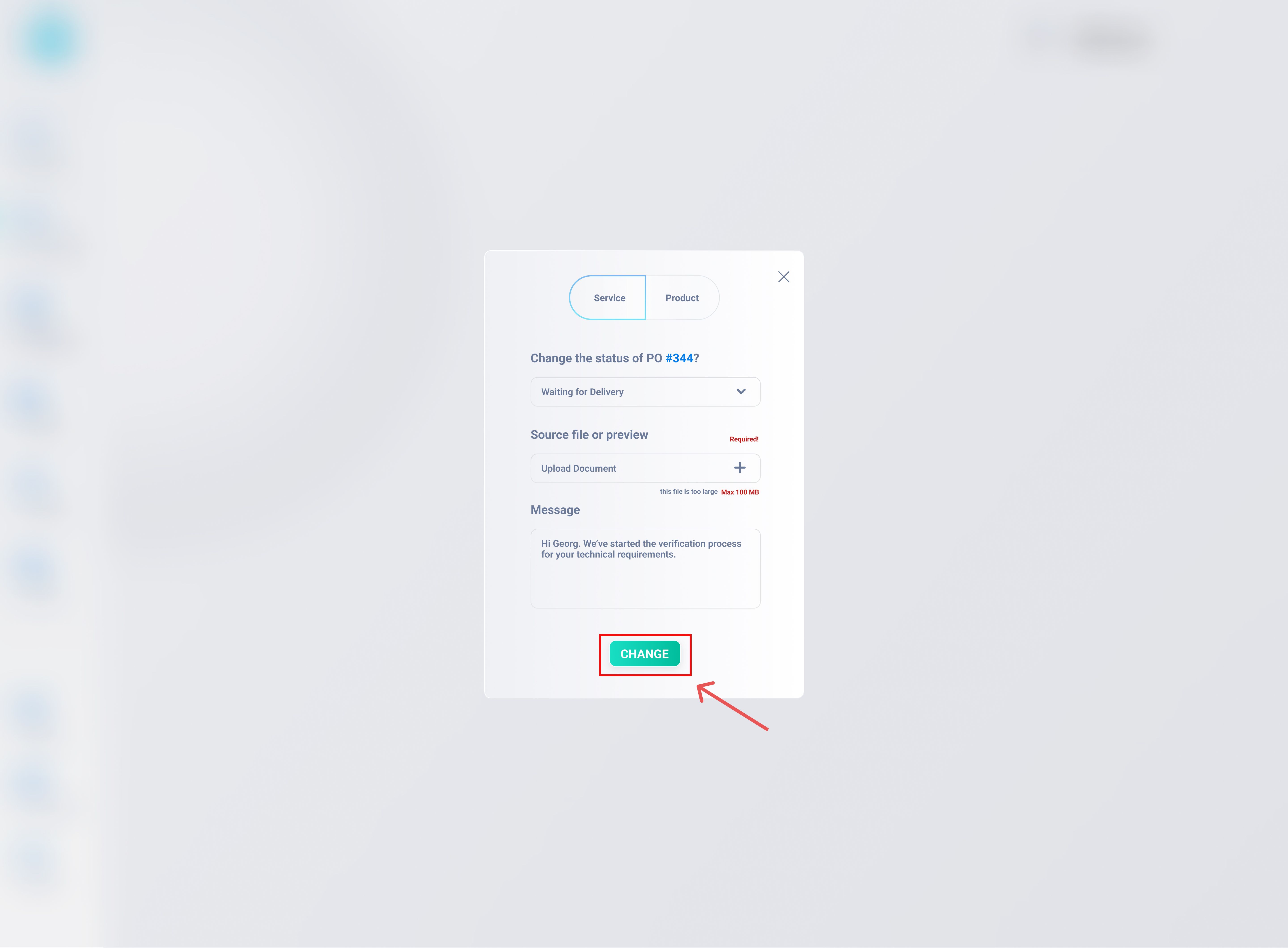
Production / Fulfillment
The seller prepares or ships the goods.
Nexity can capture updates such as “Shipped,” “Arrived at Customs,” or “Delivered,” depending on your internal logistics setup.
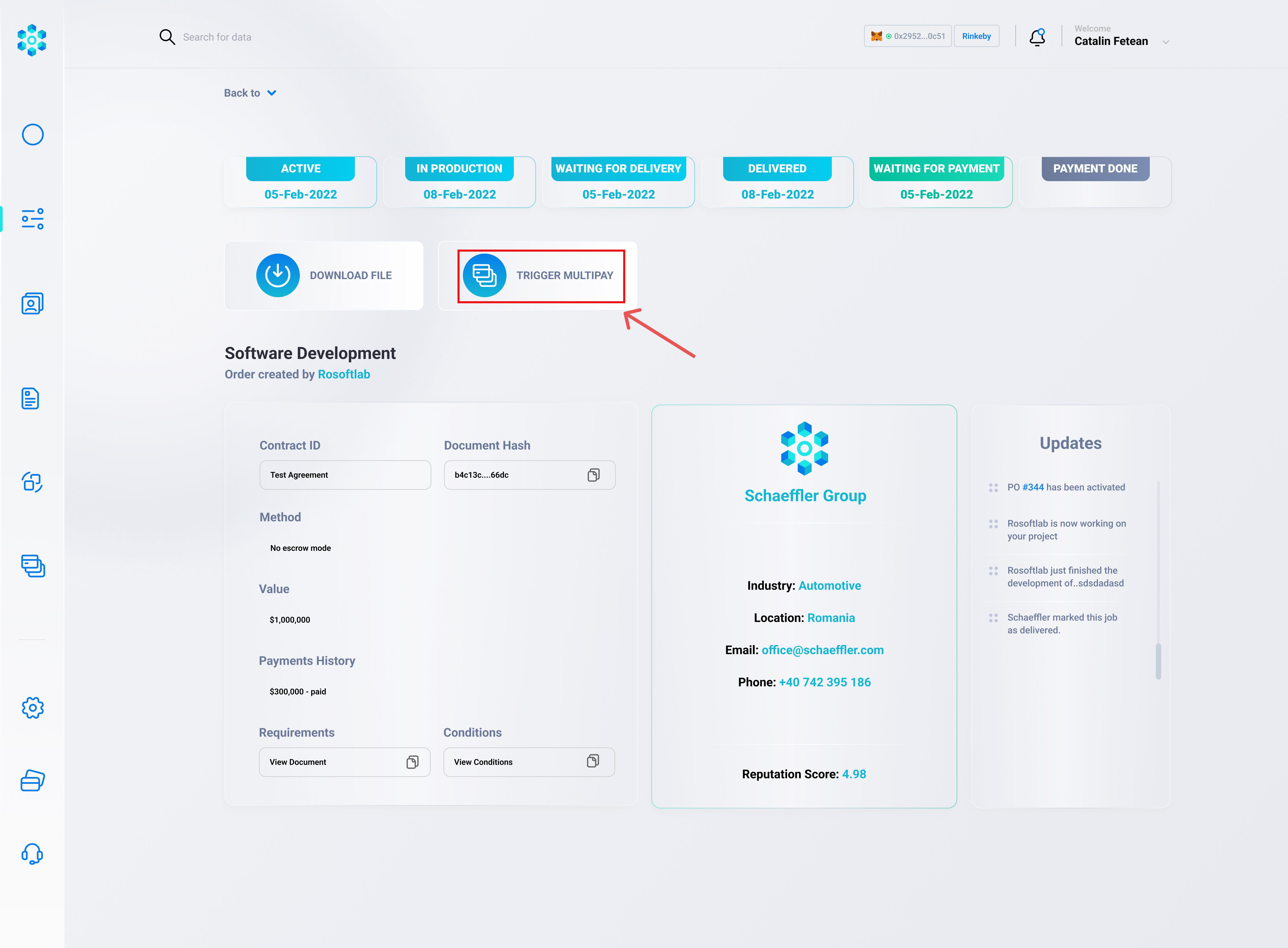
Invoice Generation
When the seller is ready to invoice (e.g., upon shipping or after partial delivery), they create an invoice within Nexity.
The platform automatically pulls data from the order (item descriptions, quantity, price) and from the contract (payment terms, buyer/seller details).
The invoice is then sent to the buyer, who can review and proceed with Payment Flow
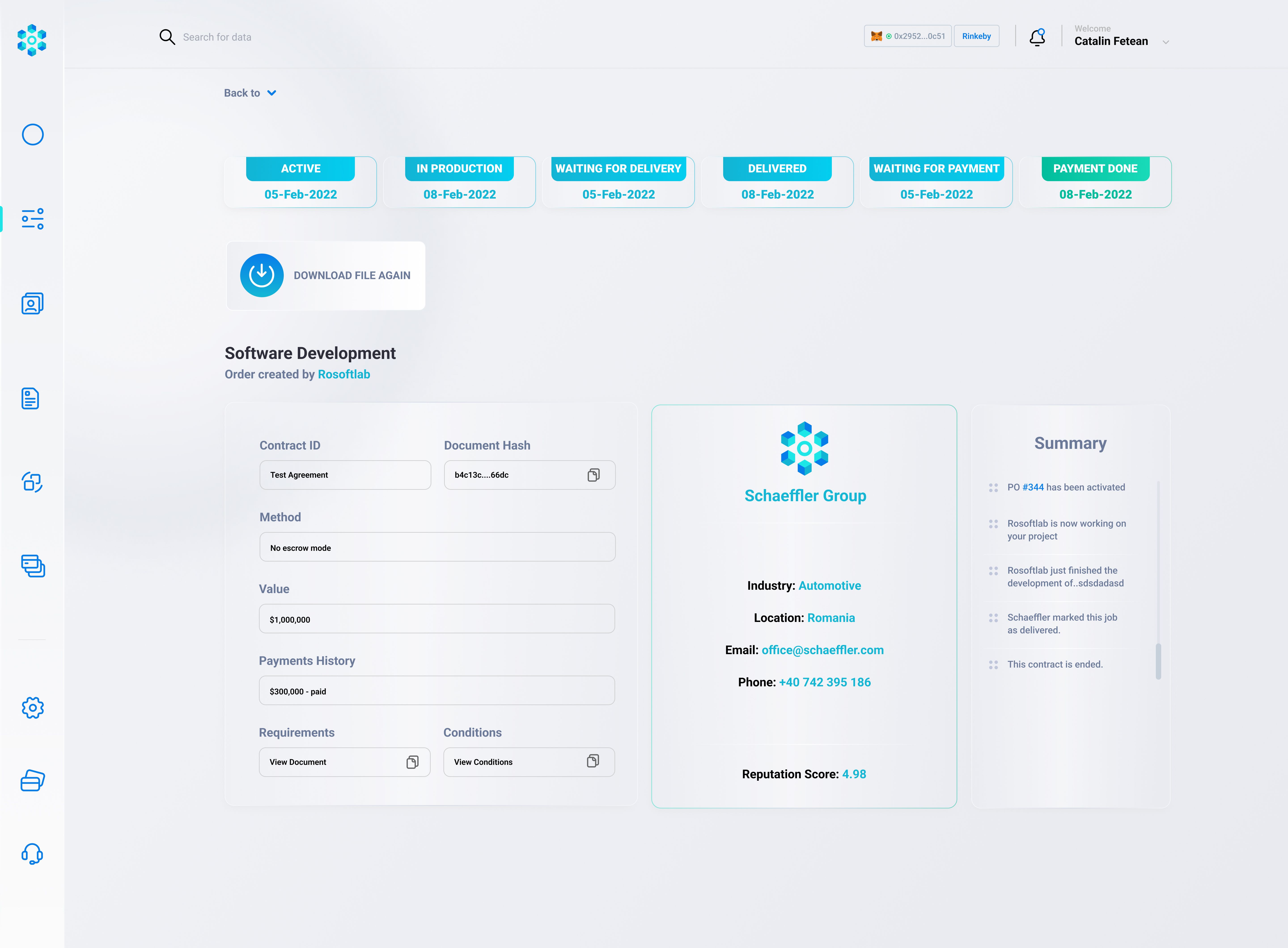
Completion
Once the buyer pays the invoice, and everything is delivered as per the contract terms, the order status changes to “COMPLETED.”
Nexity stores a record of the final invoice, any partial shipments, and payment confirmations—keeping an auditable log for future reference.
Data Model
-- 1. Orders Table
CREATE TABLE orders (
    id SERIAL PRIMARY KEY,
    order_number VARCHAR(50) UNIQUE NOT NULL,
    contract_id INT REFERENCES contracts(id),
    buyer_id INT REFERENCES users(id),
    seller_id INT REFERENCES users(id),
    quantity NUMERIC(18,2),     -- e.g., 5000
    price_per_unit NUMERIC(18,2),
    currency VARCHAR(10),
    status VARCHAR(50) DEFAULT 'PENDING',
      -- e.g. 'PENDING', 'IN_PROGRESS', 'SHIPPED', 'DELIVERED', 'COMPLETED'
    created_at TIMESTAMP DEFAULT NOW(),
    updated_at TIMESTAMP DEFAULT NOW()
);

-- 2. Invoices Table
CREATE TABLE invoices (
    id SERIAL PRIMARY KEY,
    invoice_number VARCHAR(50) UNIQUE NOT NULL,
    order_id INT REFERENCES orders(id),
    buyer_id INT REFERENCES users(id),
    seller_id INT REFERENCES users(id),
    total_amount NUMERIC(18,2),
    currency VARCHAR(10),
    status VARCHAR(50) DEFAULT 'UNPAID',
      -- e.g. 'UNPAID', 'PARTIALLY_PAID', 'PAID'
    invoice_pdf_hash VARCHAR(255),  -- optional if storing a hash of the PDF
    created_at TIMESTAMP DEFAULT NOW(),
    updated_at TIMESTAMP DEFAULT NOW()
);Notes:
We link
ordersto acontract_idso the order inherits relevant contract data.Each
invoicereferences anorder_id. If multiple partial invoices are possible, you can create multiple invoices for the same order.
Backend Endpoints
Create an order (buyer side)
// src/routes/orders.js
const router = require('express').Router();
const { pool } = require('../db');
const auth = require('../middleware/auth');
const crypto = require('crypto');

function generateOrderNumber() {
  return `ORD-${Date.now()}-${crypto.randomBytes(2).toString('hex')}`;
}

// POST /api/orders
router.post('/', auth, async (req, res) => {
  try {
    const userId = req.user.userId; // The buyer's user ID
    const { contractId, quantity, pricePerUnit, currency } = req.body;

    // Check the contract to find the seller
    const contractRes = await pool.query(`
      SELECT seller_id, buyer_id
      FROM contracts
      WHERE id = $1
    `, [contractId]);

    if (contractRes.rows.length === 0) {
      return res.status(404).json({ error: 'Contract not found' });
    }
    const { seller_id, buyer_id } = contractRes.rows[0];

    // Make sure the user is the buyer (or has permission)
    if (buyer_id !== userId) {
      return res.status(403).json({ error: 'Only the buyer can create an order' });
    }

    const orderNumber = generateOrderNumber();

    // Insert order
    const insertQuery = `
      INSERT INTO orders (
        order_number, contract_id, buyer_id, seller_id,
        quantity, price_per_unit, currency, status
      )
      VALUES ($1, $2, $3, $4, $5, $6, $7, 'PENDING')
      RETURNING *
    `;
    const values = [
      orderNumber,
      contractId,
      buyer_id,
      seller_id,
      quantity,
      pricePerUnit,
      currency
    ];
    const result = await pool.query(insertQuery, values);

    return res.status(201).json({
      message: 'Order created successfully',
      order: result.rows[0]
    });
  } catch (error) {
    console.error(error);
    return res.status(500).json({ error: 'Server error' });
  }
});

module.exports = router;
Confirm/Accept an order (seller side)
// PATCH /api/orders/:id/confirm
router.patch('/:id/confirm', auth, async (req, res) => {
  try {
    const orderId = req.params.id;
    const userId = req.user.userId;

    // Fetch the order
    const orderRes = await pool.query(`
      SELECT * FROM orders WHERE id = $1
    `, [orderId]);
    if (orderRes.rows.length === 0) {
      return res.status(404).json({ error: 'Order not found' });
    }
    const order = orderRes.rows[0];

    // Check if the user is the seller
    if (order.seller_id !== userId) {
      return res.status(403).json({ error: 'Not authorized to confirm this order' });
    }

    // Update status to 'IN_PROGRESS'
    await pool.query(`
      UPDATE orders
      SET status = 'IN_PROGRESS', updated_at = NOW()
      WHERE id = $1
    `, [orderId]);

    return res.json({ message: 'Order confirmed and now in progress.' });
  } catch (error) {
    console.error(error);
    return res.status(500).json({ error: 'Server error' });
  }
});
Update status (e.g., “Shipped,” “Delivered”)
// PATCH /api/orders/:id/status
router.patch('/:id/status', auth, async (req, res) => {
  const { status } = req.body; // e.g. 'SHIPPED', 'DELIVERED', 'COMPLETED'
  const orderId = req.params.id;
  const userId = req.user.userId;

  try {
    // Check if user is either buyer or seller in the order
    const orderRes = await pool.query('SELECT * FROM orders WHERE id = $1', [orderId]);
    if (orderRes.rows.length === 0) {
      return res.status(404).json({ error: 'Order not found' });
    }
    const order = orderRes.rows[0];

    // Basic access control: seller might update shipping, buyer might confirm final receipt
    if (order.seller_id !== userId && order.buyer_id !== userId) {
      return res.status(403).json({ error: 'Not authorized' });
    }

    // Update
    await pool.query(`
      UPDATE orders
      SET status = $1, updated_at = NOW()
      WHERE id = $2
    `, [status, orderId]);

    return res.json({ message: `Order status updated to ${status}` });
  } catch (error) {
    console.error(error);
    return res.status(500).json({ error: 'Internal server error' });
  }
});
Retrieve invoice PDF or data
// src/routes/invoices.js
const router = require('express').Router();
const { pool } = require('../db');
const crypto = require('crypto');

function generateInvoiceNumber() {
  return `INV-${Date.now()}-${crypto.randomBytes(2).toString('hex')}`;
}

// POST /api/invoices
router.post('/', async (req, res) => {
  const { orderId } = req.body;
  const userId = req.user.userId;

  try {
    // Load the order
    const orderRes = await pool.query('SELECT * FROM orders WHERE id = $1', [orderId]);
    if (orderRes.rows.length === 0) {
      return res.status(404).json({ error: 'Order not found' });
    }
    const order = orderRes.rows[0];

    // Only the seller can create the invoice
    if (order.seller_id !== userId) {
      return res.status(403).json({ error: 'Not authorized to create invoice' });
    }

    // Calculate total amount
    const totalAmount = order.quantity * order.price_per_unit;

    // Insert invoice
    const invoiceNumber = generateInvoiceNumber();
    const insertQuery = `
      INSERT INTO invoices (
        invoice_number, order_id, buyer_id, seller_id,
        total_amount, currency, status
      )
      VALUES ($1, $2, $3, $4, $5, $6, 'UNPAID')
      RETURNING *
    `;
    const values = [
      invoiceNumber,
      order.id,
      order.buyer_id,
      order.seller_id,
      totalAmount,
      order.currency
    ];
    const invoiceRes = await pool.query(insertQuery, values);

    return res.status(201).json({
      message: 'Invoice created successfully',
      invoice: invoiceRes.rows[0]
    });
  } catch (error) {
    console.error(error);
    return res.status(500).json({ error: 'Internal server error' });
  }
});

module.exports = router;
Possibly an endpoint to mark invoice as “Paid.”
// PATCH /api/invoices/:id/pay
router.patch('/:id/pay', async (req, res) => {
  const invoiceId = req.params.id;
  const userId = req.user.userId;

  try {
    // Typically the buyer triggers this after successful payment
    // Check invoice
    const invoiceRes = await pool.query('SELECT * FROM invoices WHERE id = $1', [invoiceId]);
    if (invoiceRes.rows.length === 0) {
      return res.status(404).json({ error: 'Invoice not found' });
    }
    const invoice = invoiceRes.rows[0];

    // Ensure the user is the buyer
    if (invoice.buyer_id !== userId) {
      return res.status(403).json({ error: 'Not authorized to pay this invoice' });
    }

    // Update status
    await pool.query(`
      UPDATE invoices
      SET status = 'PAID', updated_at = NOW()
      WHERE id = $1
    `, [invoiceId]);

    return res.json({ message: 'Invoice marked as paid.' });
  } catch (error) {
    console.error(error);
    return res.status(500).json({ error: 'Internal server error' });
  }
});
Generate PDF & Store Hash
// POST /api/invoices/:id/generatePdf
router.post('/:id/generatePdf', async (req, res) => {
  const invoiceId = req.params.id;
  const userId = req.user.userId;

  try {
    // Fetch invoice + order details
    const invoiceRes = await pool.query(
      `SELECT i.*, o.quantity, o.price_per_unit, c.title AS contract_title
       FROM invoices i
       JOIN orders o ON i.order_id = o.id
       JOIN contracts c ON o.contract_id = c.id
       WHERE i.id = $1`,
      [invoiceId]
    );
    if (invoiceRes.rows.length === 0) {
      return res.status(404).json({ error: 'Invoice not found' });
    }
    const invoice = invoiceRes.rows[0];

    // Confirm the user is either the seller or authorized
    if (invoice.seller_id !== userId) {
      return res.status(403).json({ error: 'Not authorized' });
    }

    // 1. Generate PDF (using a library or manual approach).
    // For brevity, let's say we generate a buffer from pdfKit or pdfMake:
    const pdfBuffer = await createPdfBuffer(invoice);

    // 2. Compute a hash of the PDF
    const pdfHash = crypto.createHash('sha256').update(pdfBuffer).digest('hex');

    // 3. Store the hash in the DB
    await pool.query(
      `UPDATE invoices
       SET invoice_pdf_hash = $1, updated_at = NOW()
       WHERE id = $2`,
      [pdfHash, invoiceId]
    );

    // 4. Optionally store or return the PDF to the front-end
    // e.g., store in S3, or send as a base64 to the client
    // For demonstration, let's just return the base64
    const pdfBase64 = pdfBuffer.toString('base64');

    return res.json({
      message: 'Invoice PDF generated',
      pdfHash,
      pdfBase64
    });
  } catch (error) {
    console.error(error);
    return res.status(500).json({ error: 'Internal server error' });
  }
});
Extended Workflow
Buyer references an active contract to create an Order (
POST /api/orders).Seller confirms the order (
PATCH /api/orders/:id/confirm).As goods are produced/shipped, the order status is updated (
PATCH /api/orders/:id/status).Once shipping or milestone is reached, the seller generates an Invoice:
POST /api/invoices→ creates an invoice record.POST /api/invoices/:id/generatePdf→ produces a PDF, stores a hash.
The buyer pays the invoice using the Payment Flow. Upon success, we call
PATCH /api/invoices/:id/pay.The order eventually transitions to COMPLETED once all shipments are delivered and invoices are paid.
Additional Considerations
Partial Orders or Multiple Invoices:
If the contract allows partial deliveries, you can have multiple orders or multiple shipments. Each shipment might have its own invoice.
Notification System:
Notify the buyer when an invoice is issued. Notify the seller when it’s paid.
Document Hashing:
For compliance, storing a hash of the PDF invoice ensures no tampering after generation.
Archiving & Audit Trails:
Keep track of all status changes in an
audit_logstable or a separate journaling system.
Integration with Part 8 (Payment Flow):
Once the invoice is generated, the buyer can pay via Circle, open banking (SmartPay), or on-chain USDC. The invoice status updates upon confirmation.
Escrow Protocol for Orders & Tokenized Invoice Financing
Why Escrow & Tokenized Invoices?
In a typical business transaction, buyers and sellers want assurance that their funds or goods are safe until each party fulfills its obligations. Escrow accomplishes this by holding money (or tokens) in a secure, neutral smart contract until certain conditions (like order completion) are met.
Meanwhile, tokenizing an invoice turns that invoice into a digital asset (often an NFT or ERC20-based representation) that proves a future payment stream. With the NXT Liquidity Pools, a business can present this tokenized invoice as collateral to access on-chain liquidity—unlocking instant funding without waiting for the buyer to pay.
Below, we’ll see how these two concepts fit into Nexity’s Order Flow and the NXT approach to borderless trade finance.
Escrow Protocol within the Order Flow
Order Placement & Escrow Initialization
Buyer & Seller have a contract. The buyer initiates an order referencing that contract’s terms (price, quantity, timeline).
An escrow contract is automatically created or referenced for the order, holding the buyer’s funds in stablecoins (e.g., USDC). The buyer deposits the required amount (or a milestone deposit).
This escrow ensures the seller only receives the funds when the order status is “fulfilled,” “delivered,” or upon meeting certain milestones.
High-Level Escrow Logic:
// Simplified Escrow for demonstration
contract NexityEscrow {
    address public buyer;
    address public seller;
    uint256 public amount;
    bool public orderFulfilled;

    constructor(address _buyer, address _seller, uint256 _amount) {
        buyer = _buyer;
        seller = _seller;
        amount = _amount;
    }

    function deposit() external payable {
        // Buyer deposits stablecoins or ETH wrapped in USDC logic
    }

    function markFulfilled() external {
        require(msg.sender == buyer, "Only buyer can confirm fulfillment");
        orderFulfilled = true;
    }

    function releaseFunds() external {
        require(orderFulfilled, "Order not fulfilled yet");
        // Transfer escrowed funds to seller
    }
}
Advanced Escrow Protocol for Orders
Multi-Stage or Milestone-Based Escrow
Unlike a simple “one-time deposit” approach, the advanced Nexity Escrow Protocol can handle multiple milestones in a single order:
Down Payment (e.g., 30% deposit) upon order confirmation.
Progress Payment(s) (e.g., 40% upon production complete).
Final Payment (remaining 30% upon delivery confirmation).
Each milestone has its own triggers (production updates, inspection certificates, shipping docs, etc.) that must be uploaded or validated before that portion of funds is released.
Data Model
CREATE TABLE order_escrows (
  id SERIAL PRIMARY KEY,
  order_id INT REFERENCES orders(id),
  total_escrowed NUMERIC(18, 2) DEFAULT 0, -- total locked
  escrow_address VARCHAR(100),            -- on-chain contract reference
  current_milestone INTEGER DEFAULT 0,
  milestone_details JSONB,                -- e.g. [{percent: 30, condition: 'order_confirmed'}, ...]
  created_at TIMESTAMP DEFAULT NOW(),
  updated_at TIMESTAMP DEFAULT NOW()
);
Milestone Logic:
Each array item in
milestone_detailsdescribes percentage of the total, plus the condition that triggers release.The protocol checks off conditions as they are completed, releasing partial funds from the escrow contract.
The final milestone typically includes buyer’s acceptance of goods.
Smart Contract (Advanced)
Below is a more intricate escrow contract dealing with multi-milestone release.
// SPDX-License-Identifier: MIT
pragma solidity ^0.8.19;

contract MultiMilestoneEscrow {
    struct Milestone {
        uint256 percent;      // e.g., 30 means 30% of total
        bool isReleased;
        bytes32 conditionKey; // e.g., "production_done", "delivery_confirmed"
    }

    address public buyer;
    address public seller;
    uint256 public totalAmount;
    mapping(uint256 => Milestone) public milestones; // e.g. 0, 1, 2...
    uint256 public milestoneCount;
    bool public isFunded;

    constructor(
        address _buyer,
        address _seller,
        uint256 _totalAmount,
        Milestone[] memory _milestones
    ) {
        buyer = _buyer;
        seller = _seller;
        totalAmount = _totalAmount;
        milestoneCount = _milestones.length;

        for (uint256 i = 0; i < _milestones.length; i++) {
            milestones[i] = _milestones[i];
        }
    }

    // The buyer (or platform) funds the escrow with stablecoin
    function fundEscrow() external {
        require(msg.sender == buyer, "Only buyer can fund");
        require(!isFunded, "Already funded");

        // Here you'd transfer stablecoins from buyer to this contract
        // e.g. an ERC20 transferFrom or pay in ETH if it's a general example
        // For brevity, assume successful deposit

        isFunded = true;
    }

    // Called by buyer or an oracle once a milestone is reached
    function releaseMilestone(uint256 milestoneId) external {
        // You might require either buyer or an off-chain oracle feed to confirm
        require(msg.sender == buyer, "Only buyer or authorized oracle can confirm");
        require(isFunded, "Escrow not funded yet");
        require(milestoneId < milestoneCount, "Invalid milestone ID");
        require(!milestones[milestoneId].isReleased, "Milestone already released");

        // Mark milestone as released
        milestones[milestoneId].isReleased = true;

        // Calculate release amount
        uint256 releaseAmount = (totalAmount * milestones[milestoneId].percent) / 100;

        // Transfer stablecoins to the seller
        // e.g. erc20.transfer(seller, releaseAmount);

        // Additional logic if partial shipping, partial confirmations, etc.
    }
}Integration:
A
MultiMilestoneEscrowinstance is deployed or assigned for each order that requires multi-step release.Buyer (or the platform) funds the contract.
As each milestone condition is met, either the buyer or an authorized oracle calls
releaseMilestone(...).
Order Fulfillment & Automatic Release
As the seller updates statuses (e.g., “Shipped,” “Delivered”), the buyer eventually confirms receipt.
Once the buyer confirms the order is fulfilled, the escrow contract releases the locked funds to the seller.
This removes the risk of non-payment for the seller, and the buyer remains confident that they won’t pay until they receive what they ordered.
Generating a Tokenized Invoice
At shipping or delivery time, the seller can generate a tokenized invoice representing the buyer’s payment obligation. That invoice is an NFT or token with metadata referencing the order, the amount due, and the expected due date.
Even though funds are in escrow, the invoice can be a separate asset used for financing if partial or milestone payments are being done, or if the seller wants immediate liquidity for the non-escrowed portion.
Using Tokenized Invoices for Liquidity in NXT Pools
Introduction to NXT Liquidity Pools
NXT introduces a borderless trade finance model, where businesses:
Tokenize real-world invoices.
Present them as collateral to NXT Liquidity Pools.
Receive working capital (i.e., immediate funds) without waiting 30-90 days for the buyer to pay.
Liquidity Providers (LPs) deposit stablecoins into these pools, earning real yield from financing actual trade invoices. This fosters a win-win:
Businesses get capital faster.
LPs earn yield from relatively lower-risk, short-term trade finance deals.
Escrow + Invoice Collateral
Invoice Tokenization
Once an order is placed, the seller can generate an on-chain invoice token (NFT or ERC20-based) referencing:
Invoice data: Buyer, amount, due date, order reference.
Escrow reference: If partial payment is escrowed, the invoice might be for the remainder or next milestone.
Borrowing Against the Invoice
The seller (or “borrower”) calls the NXT Liquidity Pool contract, requesting a loan or advance. They provide the tokenized invoice as collateral.
The pool’s on-chain credit model reviews invoice metadata (e.g., buyer’s track record, contract details, risk rating). If approved, the pool releases stablecoins to the seller.
Repayment & Settlement
When the buyer eventually pays the invoice (whether through the escrow release or a direct invoice payment), a portion or the entire amount is directed to repay the liquidity pool.
If the buyer fails to pay, the pool can enforce the invoice token’s legal or on-chain rights—this might involve returning goods or other dispute resolution.
Thus, the order is secured by escrow for immediate or partial payment, while any remaining invoice value can be turned into an asset the seller uses to access liquidity from the NXT pools.
Tokenized Invoice
// SPDX-License-Identifier: MIT
pragma solidity ^0.8.19;

/**
 * @title NexityInvoiceNFT
 * @dev A minimal NFT that represents a real-world invoice.
 */
import "@openzeppelin/contracts/token/ERC721/ERC721.sol";

contract NexityInvoiceNFT is ERC721 {
    struct InvoiceData {
        address buyer;
        address seller;
        uint256 amount;
        uint256 dueDate;
        bool isPaid;
    }

    uint256 private tokenIdCounter;
    mapping(uint256 => InvoiceData) public invoiceInfo;

    constructor() ERC721("NexityInvoice", "INVX") {}

    function mintInvoice(
        address _buyer,
        address _seller,
        uint256 _amount,
        uint256 _dueDate
    ) external returns (uint256) {
        tokenIdCounter++;
        uint256 newTokenId = tokenIdCounter;

        invoiceInfo[newTokenId] = InvoiceData({
            buyer: _buyer,
            seller: _seller,
            amount: _amount,
            dueDate: _dueDate,
            isPaid: false
        });

        _safeMint(msg.sender, newTokenId);
        return newTokenId;
    }

    function markAsPaid(uint256 tokenId) external {
        require(ownerOf(tokenId) == msg.sender, "Not invoice owner");
        InvoiceData storage data = invoiceInfo[tokenId];
        data.isPaid = true;
    }
}
Using the Invoice as Collateral in the NXT Pool
Once minted, the seller can approach the NXTLiquidityPool:
contract NXTLiquidityPool {
    // ... same as from your example, extended to accept NFTs as collateral

    mapping(uint256 => address) public collateralOwner; // track who posted which NFT

    function pledgeInvoiceAsCollateral(
        address invoiceContract,
        uint256 tokenId,
        uint256 loanAmount
    ) external {
        // Transfer the NFT from borrower to this contract
        IERC721(invoiceContract).transferFrom(msg.sender, address(this), tokenId);
        collateralOwner[tokenId] = msg.sender;

        // Approve or reject based on risk logic
        // If approved, disburse loan
        // totalLiquidity check, etc.
    }

    function repayLoan(uint256 loanId, uint256 tokenId) external {
        // borrower repays principal + interest
        // if fully repaid, return NFT to original owner
        IERC721(invoiceContract).transferFrom(address(this), collateralOwner[tokenId], tokenId);
    }
}
Invoice Generation with Granular Line Items
Sellers often need a detailed invoice. We can store line items referencing partial shipments, which can each be minted as separate invoice tokens if needed:
CREATE TABLE invoice_line_items (
  id SERIAL PRIMARY KEY,
  invoice_id INT REFERENCES invoices(id),
  description TEXT,
  quantity NUMERIC(18,2),
  unit_price NUMERIC(18,2),
  total NUMERIC(18,2)
);
Tokenizing the Invoice (Advanced NFT/EIP-1155 Approach)
EIP-1155 (multi-token standard) can represent multiple “invoices” or “invoice shares” in one contract. This is handy if a seller wants to finance only a portion of an invoice or if multiple liquidity providers co-fund it.
// SPDX-License-Identifier: MIT
pragma solidity ^0.8.19;

import "@openzeppelin/contracts/token/ERC1155/ERC1155.sol";

contract InvoiceMultiToken is ERC1155 {
    struct InvoiceDetail {
        address seller;
        uint256 amount;  // total invoice value in USDC or similar
        bool isPaid;
    }

    // tokenId => InvoiceDetail
    mapping(uint256 => InvoiceDetail) public invoiceDetails;
    uint256 public currentTokenId;

    constructor() ERC1155("https://api.nexity.io/metadata/{id}.json") {}

    function mintInvoiceToken(
        address _seller,
        uint256 _amount
    ) external returns (uint256) {
        currentTokenId++;
        _mint(_seller, currentTokenId, 1, ""); // mint 1 unit representing the entire invoice or partial
        invoiceDetails[currentTokenId] = InvoiceDetail({
            seller: _seller,
            amount: _amount,
            isPaid: false
        });
        return currentTokenId;
    }

    function markAsPaid(uint256 tokenId) external {
        require(invoiceDetails[tokenId].seller == msg.sender, "Only seller can mark paid");
        invoiceDetails[tokenId].isPaid = true;
    }
}
Collateralizing the Invoice with NXT Liquidity Pools
We can extend the earlier NXTLiquidityPool example to handle partial invoice tokenization. A seller might deposit 50% of the invoice tokens into the liquidity pool as collateral, effectively borrowing 50% of the invoice value.
Collateral Liquidation scenario:
If the buyer fails to pay the invoice or the time passes without repayment, the pool can “foreclose” on the invoice tokens.
Because the invoice tokens represent legal claims to the buyer’s payment, the pool (or an affiliated factoring entity) can attempt to collect from the buyer or proceed with legal steps.
Partial invoice logic:
// Extended from the simpler NXTLiquidityPool
contract NXTLiquidityPoolAdvanced {
    // Collateral records for each invoice token
    struct Collateral {
        address invoiceContract;
        uint256 tokenId;
        uint256 quantity; // if EIP-1155, how many units are pledged
        uint256 loanAmount;
        address borrower;
        bool liquidated;
    }

    mapping(uint256 => Collateral) public collaterals;
    uint256 public collateralIdCounter;

    // Basic pool state
    uint256 public totalLiquidity;
    mapping(address => uint256) public deposits;

    event CollateralPledged(uint256 collateralId, address indexed borrower, uint256 tokenId, uint256 quantity);
    event LoanDisbursed(uint256 collateralId, uint256 loanAmount);
    event Liquidation(uint256 collateralId);

    // 1. Borrower pledges invoice tokens as collateral
    function pledgeInvoiceCollateral(
        address invoiceContract,
        uint256 tokenId,
        uint256 quantity,
        uint256 loanAmount
    ) external {
        // Transfer the EIP-1155 tokens from borrower to pool
        // e.g. IERC1155(invoiceContract).safeTransferFrom(msg.sender, address(this), tokenId, quantity, "");

        require(loanAmount <= totalLiquidity, "Not enough liquidity available");

        collateralIdCounter++;
        collaterals[collateralIdCounter] = Collateral({
            invoiceContract: invoiceContract,
            tokenId: tokenId,
            quantity: quantity,
            loanAmount: loanAmount,
            borrower: msg.sender,
            liquidated: false
        });

        // Temporarily reduce the pool liquidity
        totalLiquidity -= loanAmount;
        // Transfer stablecoins to borrower, e.g. erc20.transfer(msg.sender, loanAmount);

        emit CollateralPledged(collateralIdCounter, msg.sender, tokenId, quantity);
        emit LoanDisbursed(collateralIdCounter, loanAmount);
    }

    // 2. Repay the loan
    function repayLoan(uint256 collateralId, uint256 amount) external {
        Collateral storage col = collaterals[collateralId];
        require(msg.sender == col.borrower, "Not the borrower");
        // e.g. require(amount >= col.loanAmount + interest, "Insufficient repayment");

        // Transfer stablecoin from borrower to pool
        // erc20.transferFrom(msg.sender, address(this), amount);

        // Return the invoice tokens
        // IERC1155(col.invoiceContract).safeTransferFrom(address(this), col.borrower, col.tokenId, col.quantity, "");

        // Increase the pool liquidity by principal + interest
        totalLiquidity += amount;

        // Mark collateral as no longer needed
        col.liquidated = true; // or remove from mapping

        // etc.
    }

    // 3. Liquidate (if borrower defaults)
    function liquidateCollateral(uint256 collateralId) external {
        // check if time has passed or borrower is in default
        Collateral storage col = collaterals[collateralId];
        // only the pool or an authorized admin can call
        require(!col.liquidated, "Already liquidated or repaid");

        // The pool retains the invoice tokens permanently or until it can recover from the buyer
        // e.g. the pool can hold the NFT and attempt to collect from the buyer off-chain
        col.liquidated = true;

        emit Liquidation(collateralId);
    }
}
Key Observations:
The pool invests in real invoices.
If the invoice is eventually paid by the buyer, the borrowed amount plus interest can be repaid to free up the tokens.
If not, the pool “liquidates” the tokens and attempts to collect directly (or sells them to a factoring service).
Risk Management & Credit Logic
Multi-Faceted Risk Score
Nexity can feed an on-chain or off-chain risk scoring system that rates each business:
Historic Payment Performance: If a seller’s past orders had timely repayment.
Dispute History: Whether the seller frequently has unresolved claims.
Transaction Volumes: Larger volumes with consistent track record → better credit rating.
External Data: (via oracles or APIs) e.g., trade insurance coverage, buyer credit rating.
A higher risk score might require the seller to post more collateral or pay a higher interest rate for the loan from the NXT pool.
Automated Underwriting
When the seller tries to pledge an invoice token:
The system calculates a recommended interest rate or a maximum allowable Loan-To-Value (LTV).
If it meets pool criteria, the loan is granted.
If not, the seller can either post additional collateral or accept a smaller loan.
Integration into the Nexity Order Lifecycle
Contract + Order → The buyer’s funds might be partially escrowed in a multi-milestone contract.
Seller Ships → Gains partial or full access to the first escrow milestone. Meanwhile, the invoice is generated for the remaining amount.
Tokenized Invoice → The seller can now approach NXT Liquidity Pools with the newly minted invoice token to get immediate working capital on the leftover portion.
Buyer Pays → Through the final escrow release or direct invoice payment, the liquidity pool loan is repaid, and the invoice NFT is returned to the seller (or burned as “paid”).
Diagrammatic Flow:
Complete Flow Overview
Contract → ensures a legal framework for the transaction.
Order → triggers an Escrow holding the buyer’s funds.
Invoice Generation → once goods are delivered or milestones reached, an invoice is created.
Tokenized Invoice → optionally minted as an NFT or on-chain representation.
Liquidity Pool Funding → the seller obtains a short-term loan from the NXT pool using the invoice NFT as collateral.
Payment → The escrow or direct buyer payment eventually flows to repay the pool, with leftover proceeds going to the seller.
This synergy reduces capital inefficiencies in trade finance. Sellers don’t wait weeks or months for the buyer’s payment, and buyers trust the escrow to ensure funds aren’t released prematurely.
Edge Cases & Advanced Features
Partial Shipments: Each partial shipment might trigger a partial invoice or multiple line items. The seller can tokenize each partial invoice.
Dispute & Arbitration: If buyer disputes quality, the escrow or invoice payment is halted. The system may freeze collateral or go into arbitration mode until resolved.
Over-Collateralization: Some high-risk sellers might be required to post 120% collateral from multiple invoices or from additional assets.
Invoice Factoring Syndication: Multiple LPs can collectively fund a large invoice, each receiving a fraction of the invoice token’s yield.
Multi-Currency: The escrow might be denominated in USD, while the invoice token is in USDC stablecoin, and the buyer pays from a different currency if there’s an integrated FX mechanism.
Security & Compliance Layers
Smart Contract Audits: The multi-milestone escrow and the NXT Liquidity Pool must undergo thorough code reviews, especially for partial or advanced liquidation logic.
Insurance / Guarantee: Some institutions may require a guarantee from trade insurers that if the buyer doesn’t pay, they’ll partially cover the default.
KYC/AML: The NXT approach typically requires all participants (buyers, sellers, LPs) to go through KYC/AML checks to comply with local regulations.
Regulated Entities: For certain jurisdictions, the NXT Pools might be structured as a regulated special purpose vehicle (SPV) that handles real-world legal claims on defaulted invoices.
Was this helpful?
Still need help? Share an idea